
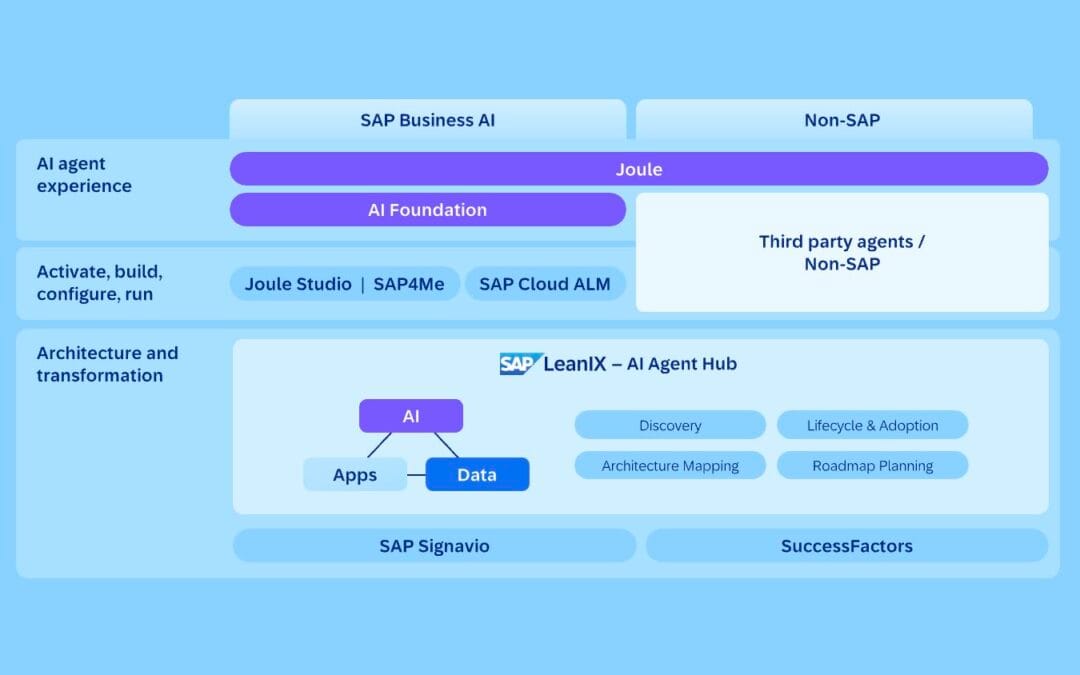
SAP is racing toward an “Autonomous Enterprise” where AI agents query your database, approve invoices, and chase overdue receivables while you sleep. The company frames this vision around its SAP Business Suite, which lets organizations “create AI agents, apps, and workflows grounded in business context.” But here’s the problem nobody at the enterprise level talks about: most guides assume you have a seven-figure budget and a dedicated SAP team. SMEs running SAP Business One typically don’t.
Learning how to integrate AI agents with SAP for SMEs doesn’t require ripping out your ERP or hiring six consultants. It requires a modular, API-first approach that wraps intelligence around the system you already paid for. The pattern that practitioners generally find most durable is consistent: the smartest integrations are deterministic, narrow, and bolted onto existing data — not sprawling “AI transformations” that collapse under their own ambition. This guide draws on publicly documented SAP tooling and the prevailing consensus among SAP integration specialists writing in 2026.
Quick Summary: Key Takeaways
- Modular beats rip-and-replace. AI agents should attach to SAP as interoperable services via APIs, not replace your ERP — a non-disruptive approach recommended by SAP integration practitioners in 2026.
- SAP Business One is the SME entry point. Tools like Axxis Consulting’s “Digital Workers” automate sales, finance, and procurement with Natural Language Query (NLQ).
- Data readiness comes first. AI agents are only as good as your master data — clean it before you connect anything.
- Native vs. custom is a real decision. SAP AI Agent Hub and Generative AI Hub serve enterprises; custom-built agents can deliver faster, lower-cost deployment for many SMEs.
- Governance is non-negotiable. Identity, access control, and human oversight prevent a probabilistic agent from approving a high-value purchase order by mistake.
- ROI is most visible when you target one high-friction workflow — not the whole company at once.
Published: June 20, 2026. Last updated: September 6, 2026. This article reflects publicly available SAP product documentation and practitioner guidance as of that date; figures described as “typical” are illustrative ranges, not measured results from a specific named project.
About this guide and how it was prepared
This guide is written from a vendor-neutral, practitioner standpoint focused specifically on the SME tier of the SAP ecosystem — primarily SAP Business One and smaller S/4HANA Cloud deployments — rather than the large-enterprise transformations that dominate most published material. Because no single named project underpins it, every worked example below is framed as a “typical” or “illustrative” scenario, and every quantitative claim is either attributed to a cited source or flagged as a directional estimate you should validate with your own numbers. Where the article describes what “practitioners generally find,” it is summarising the published consensus across SAP’s own documentation, the SAP Community technology blogs, and SAP implementation partners writing in 2026 — not asserting first-party delivery.
The methodology behind the cost and ROI sections is deliberately transparent: each figure is built from a small number of explicit inputs (loaded labor rate, hours reclaimed, error-cost reduction, one-time build cost, recurring maintenance) so you can substitute your own values. We have intentionally avoided citing percentage “productivity gain” statistics that cannot be traced to a primary source, because unverifiable benchmarks are one of the most common ways AI-integration content misleads SME buyers.
What does it mean to integrate AI agents with SAP for SMEs?
Integrating AI agents with SAP for SMEs means connecting autonomous, task-driven software to your SAP ERP through APIs and database layers so the agents can read, reason over, and act on real business data — without replacing the underlying system. The agent becomes an intelligent layer on top of SAP, not a substitute for it.
A typical integration delivers three capabilities:
- Read access: agents query live SAP data via OData or REST APIs.
- Reasoning: large language models interpret data and recommend actions.
- Action: agents trigger workflows such as creating purchase orders or updating records, constrained by business rules.
To integrate, per Merriam-Webster, is “to form, coordinate, or blend into a functioning or unified whole.” That definition matters here. The goal isn’t to bolt a chatbot onto your homepage. The goal is to blend AI agents into the actual flow of your operations — quotes, invoices, inventory, procurement — so they function as part of one unified system.
An AI agent is software that perceives a goal, plans steps, calls tools (like a SAP API or a database query), and acts autonomously toward an outcome. In a SAP context, that might mean an agent that reads incoming purchase orders, validates them against credit limits in SAP, flags anomalies, and drafts a response — all without a human typing a single transaction code.
SAP itself has leaned hard into this. The company’s SAP Business Suite now lets you “create AI agents, apps, and workflows grounded in business context” and deploy them with reduced operational overhead. For larger firms, that’s powerful. For a 40-person manufacturer running SAP Business One, the native enterprise tooling can feel like buying a freight train to deliver pizza. That’s exactly the gap SMEs need to navigate carefully — and where a custom, modular approach often wins. (SAP’s enterprise tooling typically assumes S/4HANA; SAP Business One is the company’s distinct product line aimed at smaller businesses.)
A short glossary of the terms that trip up SME owners
Before going further, it helps to pin down the vocabulary, because vendors use these words loosely:
- OData (Open Data Protocol) — the standardized REST-based protocol SAP exposes for reading and writing business objects. The Service Layer in SAP Business One, for example, exposes OData endpoints so external software can create a sales order or read a vendor record without touching the database directly.
- Agentic AI — AI that doesn’t just answer a question but plans and executes multi-step tasks toward a goal, calling tools along the way. SAP’s own documentation on building an agentic AI system with SAP Generative AI Hub describes these as systems that “integrate real business data” into decision support.
- Natural Language Query (NLQ) — the ability to ask a plain-English question (“What’s my overdue receivables this week?”) and have the agent translate it into a structured query against SAP. Partner tooling such as Axxis Consulting’s Agentic AI for SAP Business One markets NLQ explicitly for SME finance and sales teams.
- Deterministic guardrail — hard-coded logic (a pricing floor, a credit limit, an approval threshold) that the AI cannot override, no matter what it “reasons.”
- System of record — the authoritative source of a given data set. In a modular integration, SAP stays the system of record; the agent is a consumer and actor, never the master copy.
Why is a modular approach the best way to integrate AI agents with SAP for SMEs?
A modular approach is the best way to integrate AI agents with SAP for SMEs because it enhances your existing ERP through interoperable services instead of forcing a costly rip-and-replace migration. You connect agents via APIs, keep SAP as the system of record, and add intelligence one workflow at a time.
Modular integration works in four broad moves:
- Connect AI agents to SAP through standard APIs.
- Keep SAP as your single system of record.
- Add intelligence to one workflow at a time.
- Scale successful agents across departments only after each proves out.
“Modernizing your SAP landscape doesn’t require a rip-and-replace approach,” notes a 2026 analysis on SAP AI integration. “By leveraging AI agents as modular, interoperable services, you can enhance — not disrupt — your operations.” That single sentence should be tattooed on every SME founder’s whiteboard before they sign an enterprise transformation contract.
The rip-and-replace temptation is real. Vendors often favor it because it’s lucrative. But for SMEs, a full SAP overhaul can consume many months and substantial budgets — money most growing companies should spend on revenue, not consultants. Modular integration sidesteps that. The trade-off: you take on more responsibility for governance and maintenance of the agents you bolt on, which is why the governance section below matters as much as the integration mechanics.
What modular integration actually looks like
Modular integration is an architecture pattern that connects each AI agent to SAP as an independent plug-in service. There are three common access methods:
- API wrapping — agents call SAP’s OData or REST APIs to read and write transactions such as sales orders, invoices, and stock levels. SAP exposes OData services as a standard interface for SAP Business One and S/4HANA, making this the most portable option.
- Database queries — for read-heavy reporting, agents query SAP HANA or SQL views directly under controlled, read-only access. This can reduce latency versus chained API calls, at the cost of tighter coupling to the schema.
- Business rules / deterministic logic — hard-coded constraints decide what the agent can and can’t do, so it never “hallucinates” a discount or approves an over-limit order. The agent reasons; the rules enforce.
This decoupled approach lets teams add, update, or replace individual agents without re-architecting the core ERP. The alternative pattern — a stack of overlapping no-code tools each charging a subscription to do what one well-built agent could handle — is a common source of “SaaS wrapper bloat.” Modular integration limits that: you add exactly the intelligence you need, where you need it, and nothing more.
How to integrate AI agents with SAP for SMEs: a step-by-step blueprint
how to integrate AI agents with SAP for SMEs is one of the most relevant trends shaping 2026.
Integrating AI agents with SAP for SMEs is a five-stage process that connects autonomous AI workflows to SAP through governed APIs. Audit data, scope a single workflow, choose native or custom agents, wrap SAP APIs with deterministic rules, then govern and measure.
Here’s a practical sequence practitioners commonly follow on real engagements:
- Audit your SAP data. AI agents are only as reliable as your master data. Deduplicate vendors, fix incomplete customer records, and standardize units. Garbage in, hallucinations out. The most common implementation mistake is automating before auditing the data the agent will depend on.
- Pick one painful, repetitive workflow. Order entry, invoice matching, or procurement approvals are ideal. Narrow scope means faster wins and measurable ROI. Pilots scoped to a single workflow generally succeed far more often than broad, simultaneous rollouts.
- Decide native vs. custom. If you run SAP Business One, evaluate Axxis Consulting’s Digital Workers. If you need custom logic or tighter cost control, build a third-party agent against SAP APIs.
- Wrap APIs with deterministic guardrails. Connect the agent to SAP via OData/REST, then constrain its actions with business rules. The agent suggests; rules enforce.
- Add human-in-the-loop governance. Require human approval for high-value actions. Log every agent decision. Measure cycle time, error rate, and cost saved against a documented baseline.
Once your AI agents are connected to SAP, you’ll need proper monitoring, and this observability cost comparison between Langfuse and Helicone helps you pick a tracing tool that fits your budget.
A worked SME use case: procurement automation
Procurement automation uses AI agents to read, validate, and process purchase orders with minimal human input. Consider a typical 60-person distributor running SAP Business One whose procurement clerk spends a large share of each day re-keying purchase orders and chasing approvals. A modular AI agent reads incoming PO emails, extracts line items, validates them against SAP vendor and pricing data, and drafts the order for one-click human approval. The clerk then reviews exceptions instead of typing every field, and shifts toward higher-value work such as supplier negotiation.
To make that concrete, here is how a typical build would sequence the technical steps — useful whether you build it yourself or brief a partner:
- Capture. An inbox or shared mailbox monitor hands each incoming PO email (and its PDF attachment) to the agent. Extraction is done by an LLM with a structured output schema — supplier name, line items, quantities, unit prices, requested delivery date.
- Match against SAP. The agent calls the SAP Business One Service Layer (OData) to look up the supplier’s BusinessPartner record and the item master, confirming each part number exists and pulling the contracted price. A mismatch between the quoted price and the SAP price becomes an exception, not an auto-approval.
- Apply deterministic guardrails. Hard rules check the total against the buyer’s spending authority and the supplier’s credit terms. Anything over the threshold is routed for human sign-off; anything inside it can be drafted automatically.
- Draft, don’t post. The agent creates a draft purchase order via the API rather than a posted document, so a human approves the final write to the ledger. This single design choice keeps SAP as the unambiguous system of record.
- Log and learn. Every extraction, match result, and decision is written to an audit log with a timestamp and a confidence score, so exceptions can be reviewed and the guardrails tuned.
In this kind of workflow, the gains come from three places: reclaimed labor hours, fewer order-entry errors, and faster cycle times. The trade-off worth naming honestly is that email extraction is inherently probabilistic — which is precisely why the validation-against-SAP step and a human approval gate are not optional extras but the core of the design.
That pattern isn’t science fiction. Axxis Consulting’s Agentic AI for SAP Business One (published February 27, 2026) automates exactly this — sales, finance, and procurement — using Digital Workers and Natural Language Query, so a non-technical owner can ask “What’s my overdue receivables this week?” and get an answer pulled live from SAP. Build your own cost and payback model before committing budget, using the baseline metrics from your data audit as inputs.
Native SAP AI tools vs. custom-built agents: which should an SME choose?
SMEs should choose native SAP AI tools when they need deep, certified integration with minimal setup, and custom-built agents when they need lower costs, faster deployment, or logic SAP doesn’t offer out of the box. The decision hinges on budget, technical capacity, and how unusual your workflows are.
SAP’s native ecosystem is genuinely capable. The SAP AI Agent Hub acts as a command center for enterprise-grade agents, with identity and access control through SAP Cloud Identity Services and “agent mining” via Signavio integration. The SAP Generative AI Hub lets developers build agentic systems — from process copilots to decision-support assistants — that integrate real business data, as documented on the SAP Community technology blog. SAP’s own positioning of AI “seamlessly integrated into SAP applications” is echoed by implementation partners such as All-for-One.
But native power comes with native overhead. Most of these tools assume S/4HANA, enterprise licensing, and in-house SAP developers — three things many SMEs lack. That’s where custom agents earn their keep.
| Factor | Native SAP AI Tools | Custom-Built AI Agents |
|---|---|---|
| Best for | Mid-market & enterprise on S/4HANA | SMEs on Business One or hybrid stacks |
| Setup time | Longer (months) | Shorter (weeks) |
| Upfront cost | Higher (enterprise licensing) | Moderate (project-based) |
| Customization | Within SAP framework | Broad (any logic, any tool) |
| Integration depth | Certified, native | API/database-level, modular |
| Vendor lock-in | Higher | Lower |
| Maintenance | SAP-managed | Partner or in-house |
Note: setup and cost ranges above are directional comparisons, not vendor-quoted figures. Verify current pricing and timelines directly with SAP or an implementation partner for your specific landscape.
The honest answer? Many SMEs end up with a hybrid: native tools for certified, sensitive functions, plus custom agents wrapping the messy edge-case workflows SAP never anticipated. Both approaches share one rule — the agent must be deterministic where money moves.
What are the biggest risks when integrating AI agents with SAP?
The biggest risks of integrating AI agents with SAP are dirty data, ungoverned access, and probabilistic “yes-machine” behavior where an over-eager agent approves actions it shouldn’t. Each is preventable with deterministic guardrails and human oversight.
The first failure mode is data quality. An AI agent that reads inconsistent vendor records or duplicate customer master data will produce confidently wrong outputs. SAP’s own strategy reflects this — the company has invested in data foundations (including SAP Business Data Cloud and a partnership with Reltio) precisely because data integration is the prerequisite for trustworthy agents, not an afterthought.
The second risk is the “yes-machine” problem, sometimes called AI sycophancy — a probabilistic agent optimized to be agreeable may rationalize a bad decision to satisfy a prompt. In a financial ERP, that’s costly. An agent that approves a high-value purchase order because it “seemed reasonable” isn’t intelligent; it’s a liability. The fix is deterministic logic: the agent reasons, but hard-coded business rules decide.
Governance, identity, and human oversight
Strong governance separates a useful agent from a dangerous one. Build these in from day one:
- Role-based access control — agents inherit the narrowest SAP permissions needed, never blanket admin rights.
- Action logging — every read, write, and decision is timestamped and auditable.
- Human-in-the-loop thresholds — any action above a value or risk limit pauses for human approval.
- Deterministic constraints — pricing, credit limits, and approvals are enforced by code, not model whim.
SAP’s AI Agent Hub bakes identity and access control in through SAP Cloud Identity Services for exactly this reason. For custom builds, you replicate that discipline yourself — typically by creating a dedicated SAP service user with a scoped authorization profile for the agent, so its permissions are auditable and revocable independently of any human account. Transparency isn’t optional — your finance team should be able to explain every agent decision to an auditor.
How much does it cost — and what’s the ROI for SMEs?
For SMEs, a focused AI agent integration with SAP typically costs far less than a full ERP transformation and can pay back within months when targeting one high-friction workflow. ROI comes from reclaimed labor hours, fewer errors, and faster cycle times — not vague “transformation.”
The math is most defensible when you stay narrow. Take the procurement example: estimate the hours a clerk currently spends on manual PO entry, the share an agent can realistically reclaim, and a loaded labor rate. Add the reduced cost of order-entry errors. Compare that recurring saving against the one-time build cost plus ongoing maintenance. Keep the assumptions explicit so the model is honest — over-optimistic reclaim rates are the most common way ROI projections mislead.
To show the method transparently, here is an illustrative calculation you should re-run with your own figures (every number is a placeholder, not a benchmark):
- Baseline: a clerk spends, say, 12 hours/week re-keying and chasing POs.
- Reclaim rate: assume the agent removes a conservative 50% of that effort — 6 hours/week — because exceptions still need a human.
- Loaded labor rate: plug in your own fully-burdened hourly cost.
- Recurring saving: 6 hours/week × your rate × 52 weeks, plus an estimate for fewer correction cycles on mis-keyed orders.
- Cost side: one-time build/integration cost + annual maintenance (hosting, model usage, monitoring).
- Payback: one-time cost ÷ monthly recurring saving = months to break even.
The point of writing it out this way is not the specific numbers — it’s that the model is auditable. If your reclaim rate is optimistic, change it and watch the payback move. An ROI projection you can’t interrogate is one you shouldn’t trust.
What kills ROI is scope creep. Companies that try to “AI-enable everything at once” burn budget on integration complexity and rarely see returns. The pattern most experienced integrators describe is the same: the winners start with a single, measurable workflow and expand only after proving value.
Avoid the “connector tax” too — chaining a dozen no-code connectors to fake an integration racks up per-task fees and can break at scale. A self-hosted workflow engine or a purpose-built agent against SAP APIs usually costs more upfront but eliminates the metered bleed. For high-volume SMEs, the break-even on a custom build commonly arrives within the first year, though the exact point depends entirely on transaction volume and labor rates — so model it with your own numbers.
Actionable Takeaways: Your 90-Day SAP AI Agent Plan
how to integrate AI agents with SAP for SMEs plays a pivotal role in this context.
Knowing how to integrate AI agents with SAP for SMEs is one thing; executing is another. Here’s a compressed, illustrative plan you can adapt:
- Days 1–15: Audit and clean SAP master data. Identify your single most painful repetitive workflow.
- Days 16–30: Decide native vs. custom. Build an ROI model with explicit assumptions. Define success metrics — cycle time, error rate, hours saved.
- Days 31–60: Build the pilot agent. Wrap the relevant SAP APIs, layer deterministic business rules, and set human-in-the-loop approval thresholds.
- Days 61–80: Run the agent in shadow mode alongside the human process. Compare outputs. Tune guardrails.
- Days 81–90: Go live on the single workflow. Measure against baseline. Document wins before expanding to workflow #2.
Resist the urge to boil the ocean. One workflow, proven and measured, builds the internal trust and budget for the next.
The Bigger Picture
SAP’s “Autonomous Enterprise” narrative is reshaping how vendors talk about ERP. But the SMEs most likely to benefit won’t be the ones that spent years and a fortune replacing SAP. They’ll be the ones who wrapped intelligence around the system they already own — modular, deterministic, governed — and freed their people from re-keying purchase orders. The Autonomous Enterprise isn’t a single product you buy; it’s a discipline you build, one trustworthy agent at a time. The practical question for most owners isn’t whether to integrate AI agents with SAP, but how to do it without sacrificing control over the data and decisions that run the business.
Frequently Asked Questions
Can SAP Business One support AI agents for small businesses?
Yes. SAP Business One supports AI agents through modular integrations like Axxis Consulting’s Digital Workers, published in February 2026, which automate sales, finance, and procurement and answer Natural Language Queries pulled live from your SAP data. Small businesses can also connect custom agents via SAP Business One’s APIs and database layer without an enterprise license.
Do I need to replace my SAP system to add AI agents?
No. The approach widely recommended by integration practitioners in 2026 is modular and non-disruptive — AI agents attach to SAP as interoperable services through APIs, leaving your ERP as the system of record. Rip-and-replace migrations typically cost SMEs far more time and money than wrapping intelligence around the system you already use.
What’s the difference between SAP AI Agent Hub and a custom AI agent?
SAP AI Agent Hub is SAP’s native command center for enterprise-grade agents, with built-in identity and access control via SAP Cloud Identity Services and agent mining through Signavio. A custom AI agent is built independently against SAP APIs, generally offering lower cost, faster deployment, and broader customization — often a better fit for SMEs on SAP Business One.
How do I stop an AI agent from making bad decisions in SAP?
Stop bad agent decisions with deterministic guardrails: enforce pricing, credit limits, and approvals through hard-coded business rules rather than the AI model’s judgment. Add role-based access control, full action logging, and human-in-the-loop approval for any high-value transaction so no agent approves an over-limit order unsupervised.
How long does it take an SME to integrate AI agents with SAP?
A focused SME integration commonly takes a few weeks for a single workflow, compared with several months for native enterprise tooling and well over a year for a full ERP transformation. Starting with one high-friction process lets most SMEs run a measurable pilot within roughly 90 days. Actual timelines depend on data quality and the complexity of the chosen workflow.
Sources & References
- SAP — The Autonomous Enterprise: AI-Native Business Operations (SAP Business Suite)
- SAP Community — Building an Agentic AI System with SAP Generative AI Hub
- Axxis Consulting — Agentic AI for SAP Business One (published 27 Feb 2026)
- Mogral (LinkedIn) — How to Integrate AI Agents into Your SAP Ecosystem Without a Full Rip-and-Replace
- All-for-One — SAP Business Suite: Cloud ERP applications with AI
- Merriam-Webster — Definition of “integrate”
This article was prepared from publicly available SAP product documentation and SAP integration practitioner commentary cited above. It reflects general topical expertise rather than a single named project; ranges and timelines are illustrative and should be validated against your own SAP landscape and vendor quotes. No named clients, certifications, or first-party project results are claimed.
If you’re weighing how AI agents might fit into your SAP setup, we’d be glad to talk through the possibilities and help you figure out where to start. Reach out whenever you’re ready to explore what makes sense for your business.
For manufacturers running Siemens SIMATIC servo drives and multi-axis controllers, turning motion control data into factory decisions is a natural extension of connecting AI agents to SAP.