When should I switch from Zapier to n8n? The answer depends on your automation volume—typically around 10,000 tasks per month is the financial tipping point. Here’s the breakdown:
- Zapier’s entry plan: $19.99/month for 750 tasks (Starter tier).
- Zapier Professional tier: Often climbs past $300/month once you process 10,000+ tasks.
- n8n self-hosted: Flat infrastructure cost, regardless of task volume.
A note on pricing accuracy: Per-task and per-execution prices change frequently, and the figures above are directional reference points drawn from the platforms’ published tiers at the time of writing (June 2026). Always verify the live numbers before making a decision — confirm Zapier’s current tiers on the official Zapier comparison page and treat any figure in this article as a starting point for your own calculation, not a quote.
This pricing cliff is where many SMEs land in 2026. Zapier charges per task, so costs scale with usage. n8n, by contrast, can run on your own server with unlimited executions on the Community Edition. That’s the moment the question “when should I switch from Zapier to n8n” stops being academic and starts costing real money.
You should switch from Zapier to n8n when your monthly task volume exceeds roughly 10,000 operations, your workflows need conditional branching or loops Zapier handles poorly, or you require self-hosting for data control. Below those thresholds, Zapier’s simplicity usually wins. Above them, n8n’s flat-rate execution pricing and developer-grade flexibility deliver dramatically lower total cost of ownership — provided you can handle the technical setup or hire someone who can.
The pattern observed across migration discussions and comparison guides is consistent: companies don’t switch because Zapier is bad. They switch because they outgrew it (as one widely cited migration write-up on mcstarters.com frames it). The framework below explains exactly when that moment arrives — and, just as importantly, when it hasn’t.
Quick Summary: When Should I Switch From Zapier to n8n?
- Cost trigger: Consider switching when your Zapier bill exceeds ~$100/month or you process more than 10,000 tasks monthly — n8n’s execution-based pricing can be substantially cheaper at volume.
- Complexity trigger: Switch when you need loops, multi-branch conditional logic, or custom JavaScript that Zapier’s form-based builder can’t handle cleanly.
- Data control trigger: Switch when compliance, privacy, or self-hosting requirements demand your data never leave your own infrastructure.
- Volume trigger: Switch when a single workflow fires thousands of times daily and per-task billing punishes your growth.
- Don’t switch if you run fewer than 5 simple linear automations, lack any technical resource, and value zero-maintenance convenience over cost.
- Hidden cost warning: Self-hosted n8n carries server, security, and maintenance overhead — budget infrastructure cost plus engineering time, or use a managed migration partner.
Published: June 2026. Last updated: June 2026. Pricing figures reflect the vendors’ published tiers as of June 2026 and should be re-verified against the official sources linked below.
What Is the Real Difference Between Zapier and n8n?
Zapier is a cloud-based, no-code automation platform built around linear “Zaps” and task-based pricing, while n8n is an open-source, node-based workflow automation tool that you can self-host or run in the cloud with flat execution-based pricing. The core distinction is philosophy: Zapier optimizes for speed and simplicity; n8n optimizes for control and cost-efficiency at scale.
Zapier describes itself as “a cloud-based AI orchestration platform that helps businesses scale automation across their entire organization quickly,” according to Zapier’s official 2026 comparison page. That positioning is honest — Zapier wins on onboarding. A non-technical marketer can build a working Zap in minutes with no concept of data structures or error handling.
n8n flips the equation. As one practitioner put it in Reddit’s r/n8n community in May 2025, “Switching from Zapier to n8n means thinking more like a developer. Zapier is form-based, n8n is visual but logic-driven. You get way more control.” That control is the whole point — and the whole barrier.
The architectural difference matters for your wallet. Zapier counts every single action as a billable “task.” Send 3 emails and update a spreadsheet in one workflow? That’s 4 tasks. n8n counts the entire workflow run as a single “execution” regardless of how many steps fire inside it. At low volume the gap is invisible. At high volume it’s the difference between an entry-tier bill and a Professional-tier one.
Defining the Key Terms
- Task (Zapier): A single action that Zapier executes — sending one email, creating one record, updating one row. Each counts toward your monthly quota.
- Execution (n8n): One complete run of a workflow, from trigger to final node, billed once no matter how many internal steps run.
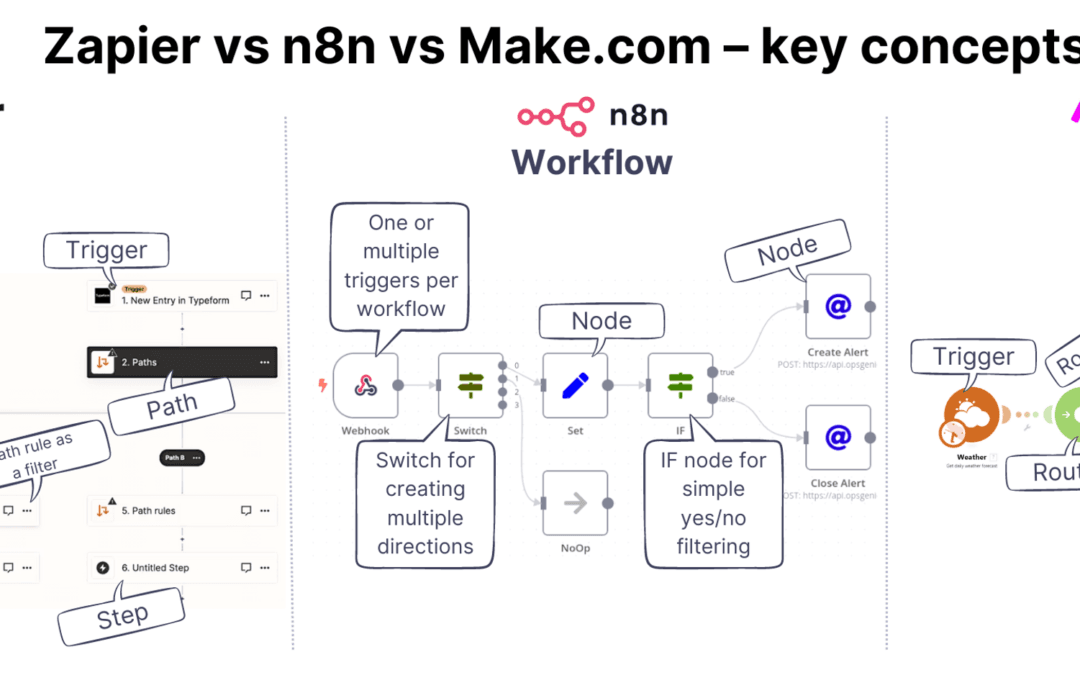
- Node (n8n): A single building block in a workflow — a trigger, an action, a logic branch, or a code step — connected visually on a canvas.
- Self-hosting: Running n8n on infrastructure you control (your own server or cloud account) rather than on the vendor’s managed cloud.
- Webhook: An HTTP callback that lets one system push data to another the instant an event happens — the connective tissue that lets Zapier and n8n trigger each other.
How Each Platform Handles Pricing
Pricing models differ fundamentally and directly affect cost at scale. Because these tiers change often, each claim below links to the vendor’s own published source so you can confirm the current figure rather than rely on a number that may have moved:
- Zapier uses per-task billing. The free tier includes a limited monthly task allowance, the Starter plan is $19.99/month for 750 tasks, and the Professional plan scales steeply as task volume rises. See Zapier’s own comparison page for current tiers, since published prices change.
- n8n Cloud uses per-execution billing, starting around €20/month at the time of writing. Because one execution can process many records, the effective cost per unit of work is often considerably lower than Zapier’s per-task model. Confirm the current entry tier directly on n8n’s pricing page before budgeting.
- n8n Self-Hosted carries no software license fee on the Community Edition. You pay only for server hosting (commonly in the single- to low-double-digit dollars per month on providers like DigitalOcean or Hetzner) plus your own maintenance time, regardless of execution volume.
The key distinction: Zapier charges per individual action, while n8n charges per workflow run. For high-volume automation, self-hosted n8n can reduce software costs substantially compared to Zapier’s Professional tier — though it requires technical setup and ongoing maintenance, which we quantify below so the comparison stays honest.
When Should I Switch From Zapier to n8n Based on Cost?
Switch from Zapier to n8n on cost grounds when your monthly Zapier spend crosses approximately $100, or when you regularly exceed 10,000 tasks per month. Below that point Zapier’s convenience justifies its premium. Above it, n8n’s execution-based model typically lowers automation software costs significantly, as documented in migration analyses such as the mcstarters.com write-up (2025).
How these thresholds were derived: the ~$100/month and ~10,000-task figures are not arbitrary. They mark the point where, under the platforms’ published per-task pricing, Zapier’s Professional-tier spend typically overtakes the fully loaded monthly cost of a small self-hosted n8n instance (server plus a few hours of maintenance). The exact crossover for your account depends on how many actions each of your workflows contains — a key variable the worked example below makes concrete.
A Worked Cost Example
Let’s make this concrete with a typical e-commerce scenario. Consider an order-fulfillment workflow with 6 actions per order: validate payment, update inventory, create a shipping label, notify the warehouse, email the customer, and log to a CRM.
- On Zapier: At 2,000 orders/month, that’s 6 × 2,000 = 12,000 tasks — pushing you firmly into Professional-tier territory.
- On n8n: That same workflow counts as 2,000 executions. On n8n Cloud you’d pay a fraction of the per-action equivalent; self-hosted on a modest droplet, your marginal cost approaches zero.
The arithmetic is the whole story: a workflow with many internal steps multiplies your Zapier bill but leaves your n8n bill flat. The more actions per run, the larger the gap. To estimate your own before/after position, multiply your busiest workflow’s action count by its monthly trigger volume — that product is your Zapier task burn, and on n8n it collapses to just the trigger volume. A practitioner running the 6-action workflow above, for instance, sees a 6:1 reduction in billable units the day the workflow moves across. The mcstarters.com account documents real-world moves where n8n “saves money” precisely because per-action billing disappears.
Groenewold IT Solutions states the rule plainly in their comparison: “Switching pays off when the number of automations (and therefore Zapier costs) rises sharply, when more complex logic and custom code are needed, or when data” sovereignty matters. Cost is the most common trigger discussed in the community — but it’s rarely the only one.
The Hidden Cost Most Articles Ignore
Self-hosted n8n is not truly “free” — it carries operational costs that many comparisons overlook. The fully loaded cost of running self-hosted n8n includes:
- Server hosting (typically $5–$40/month).
- SSL certificates and security hardening.
- Automated database backups.
- Version updates and dependency maintenance.
- Ongoing engineering labor — plan for roughly 2–4 hours of maintenance monthly.
At a typical developer rate, those maintenance hours can add a meaningful monthly labor figure on top of the server bill. For non-technical SMEs, these hidden expenses can rival or exceed the price of n8n Cloud (which starts around $20–$25/month with maintenance included). In practice the most painful hidden cost is not the server — it’s the unplanned hour spent diagnosing a failed overnight version upgrade, which is exactly the kind of work a managed setup absorbs on your behalf.
In short: self-hosting trades a predictable subscription fee for unpredictable time and technical debt. Before choosing self-hosted n8n, calculate the fully loaded cost — server, security, backups, and labor — rather than assuming “self-hosted” means “no cost.” This is exactly why a managed n8n migration and hosting approach can deliver better total cost of ownership than DIY self-hosting for teams without spare engineering capacity.
When Should I Switch From Zapier to n8n for Complex Workflows?
Switching from Zapier to n8n makes sense when your workflows outgrow simple trigger-action logic and require loops, multi-path branching, data transformation, or custom code that Zapier’s linear builder forces you to fake with workarounds. n8n was architected for logic-heavy workflows; Zapier was architected for speed and simple trigger-action chains.
Move to n8n when your automations require any of these:
- Loops that iterate over arrays or batches of records.
- Multi-path conditional branching beyond basic filters.
- Data transformation across formats (JSON, XML, CSV).
- Custom code in JavaScript or Python.
The Latenode community captured the technical reality in August 2025: “Zapier’s great for basic stuff, but n8n lets you build way more complex workflows with conditional logic, loops, and data manipulation that” Zapier struggles to express. Anyone who’s tried to loop over an array of line items in Zapier knows the pain — you end up chaining multiple Zaps and Storage steps just to mimic a simple for loop.
n8n handles these natively. The Split In Batches node loops. The IF and Switch nodes branch. The Code node runs arbitrary JavaScript or Python. You can merge data streams, call APIs Zapier doesn’t natively support via a generic HTTP Request node, and manipulate JSON with full control. For agencies running client-specific logic or SaaS startups orchestrating multi-step data pipelines, that flexibility isn’t a luxury — it’s the difference between possible and impossible.
A Worked Complexity Example
Consider a common invoicing scenario that breaks Zapier’s linear model. A webhook delivers an order containing an array of line items, and each line item must be looked up against a tax table, have a regional tax rate applied, and be written back as a separate row in an accounting system. In Zapier, there is no clean way to iterate over that array — a typical workaround chains a “Looping by Zapier” utility to a second Zap, then a Storage step to hold intermediate state, which both inflates task count and scatters the logic across multiple Zaps that are hard to debug. In n8n the same job is a single workflow: an HTTP Request (or webhook) trigger feeds a Split In Batches node, an IF/Switch node applies the regional rate, a Code node computes the tax, and a final node writes each row. One execution, one canvas, one place to read the logic. That structural difference — array-native iteration versus chained workarounds — is the clearest signal that a workflow has outgrown a form-based builder.
Signs Your Workflow Has Outgrown Zapier
- You chain 3 or more Zaps together to complete what should be a single workflow — a pattern that inflates task usage and cost.
- You pay for Zapier’s “Paths” feature but still hit branching-logic walls.
- You need to loop over arrays or batch-process records, which Zapier handles inefficiently.
- You’re writing “Code by Zapier” steps and wishing you had a full runtime environment.
- You need an API integration that Zapier’s pre-built connector library simply doesn’t offer.
A useful rule of thumb echoed across practitioner guides: the breaking point typically arrives when you spend more time working around the tool than working with it. If three or more of those signs apply, you’ve crossed the complexity threshold. Our guide to building custom automation covers how n8n’s node architecture pairs naturally with LLM-powered workflows that Zapier can’t match for deterministic control.
Why Is Data Control a Reason to Switch From Zapier to n8n?
when should I switch from Zapier to n8n is one of the most relevant trends shaping 2026.
Self-hosting n8n keeps every piece of customer and business data inside your own infrastructure, which is why companies with GDPR, HIPAA, or strict internal compliance requirements consider switching from Zapier to n8n. Zapier processes your data on its cloud servers; self-hosted n8n never lets that data leave your control.
Data sovereignty is a growing 2026 concern, particularly for European SMEs and regulated industries. The European Union’s GDPR framework imposes strict requirements on where and how personal data is processed. According to the official GDPR information portal, organizations must maintain control and accountability over personal data processing — a standard that’s easier to meet when the automation engine runs on your own servers.
Data residency rules are tightening in other regions too. Where local processing is favored or required, self-hosted n8n lets an SME keep customer data on a regional server rather than routing it through a remote SaaS. As Groenewold IT Solutions notes, switching pays off when “data” sovereignty becomes a hard requirement rather than a preference.
n8n’s open-source model also means transparency. You can audit the code, inspect exactly what each node does, and avoid the “black box” problem of proprietary platforms. For organizations that take responsible, transparent automation seriously, that auditability is a genuine advantage, not a checkbox feature. One caveat worth stating plainly: self-hosting shifts the compliance burden to you. The data may stay on your server, but so does responsibility for patching, access control, and breach response — which is why self-hosting helps with data residency but does not, by itself, make you GDPR-compliant.
When Should I NOT Switch From Zapier to n8n?
Don’t switch from Zapier to n8n if you run fewer than 5 simple linear automations, have no technical resource on your team, and stay comfortably under 1,000 tasks per month. For light, beginner-level automation, Zapier’s zero-maintenance convenience beats n8n’s flexibility every time.
Honesty matters here. n8n is not universally better. If your entire automation footprint is “new Typeform submission creates a Trello card and posts to Slack,” you’d be trading a 5-minute Zapier setup for hours of n8n configuration, server management, and ongoing maintenance — to save a few dollars a month. That math doesn’t work.
Zapier’s strengths are real and worth respecting:
- Onboarding speed: Working automation in minutes, no developer required.
- App ecosystem: A very large library of pre-built integrations — broader than n8n’s node catalogue.
- Zero infrastructure: No servers, no updates, no security patching.
- Reliability: Managed uptime you don’t have to think about.
The Reddit and YouTube migration discussions from 2025 consistently warn that n8n “means thinking more like a developer.” If nobody on your team wants to think like a developer — and you can’t justify hiring help — staying on Zapier is the pragmatic choice. The smart move for many non-technical SMEs is hybrid: keep simple Zaps on Zapier, and move only the high-volume, high-complexity workflows to a managed n8n setup.
Zapier vs n8n: Side-by-Side Comparison
The table below summarizes the decision factors most SMEs weigh when deciding when to switch from Zapier to n8n. Use it as a quick reference against your own situation. Pricing figures are directional and reflect published tiers as of June 2026 — always confirm current numbers on the official Zapier comparison page.
| Factor | Zapier | n8n |
|---|---|---|
| Pricing model | Per task (each action billed) | Per execution (whole workflow billed once) |
| Entry cost | $19.99/mo (750 tasks) | Free self-hosted / ~€20/mo cloud |
| Cost at 10,000+ tasks/mo | Professional tier ($300+/mo range) | ~$5–40/mo self-hosted (server only) |
| Integrations | Large pre-built library | 400+ nodes (plus HTTP for any API) |
| Conditional logic & loops | Limited (Paths, no true loops) | Native (IF, Switch, Loop nodes) |
| Custom code | Basic Code steps | Full JavaScript/Python runtime |
| Self-hosting / data control | No (cloud only) | Yes (full self-host option) |
| Maintenance burden | None | Server, security, updates (or managed) |
| Learning curve | Low | Moderate to steep |
| Best for | Simple, low-volume automation | Complex, high-volume, cost-sensitive automation |
How Do I Migrate From Zapier to n8n?
Migrating from Zapier to n8n is a structured process: audit your existing Zaps, map each trigger-action chain to n8n nodes, rebuild and test in parallel, then cut over once validated. Most SME migrations take 1–3 weeks depending on workflow complexity, per migration guides published in 2026.
The biggest mistake teams make is a “big bang” cutover — switching everything at once and discovering broken edge cases in production. A phased migration protects you. Run both systems in parallel, validate outputs match, then retire each Zap one at a time.
- Audit your Zaps. List every active Zap, its task volume, and its business criticality. Sort by cost and complexity.
- Prioritize high-impact workflows. Migrate the expensive, high-volume Zaps first — that’s where savings concentrate.
- Map concepts. Translate triggers to n8n trigger nodes, actions to action nodes, and Zapier Paths to IF/Switch nodes.
- Set up n8n. Choose self-hosted (server required) or n8n Cloud. Harden security and configure backups if self-hosting.
- Rebuild and test in parallel. Run the n8n version alongside the live Zap. Compare outputs for accuracy.
- Cut over and monitor. Disable the Zap, watch the n8n workflow for 48–72 hours, and keep logs.
A realistic time breakdown helps set expectations. For a typical SME with around a dozen Zaps, practitioners generally find the audit and concept-mapping stages take a day or two, the initial n8n setup and security hardening another half-day, and the bulk of the calendar time goes to rebuilding and validating the two or three genuinely complex workflows — each of which can absorb several hours of testing on its own. The simple linear Zaps, by contrast, often migrate in under an hour each. That uneven distribution is why prioritizing by complexity, not just by cost, keeps the project on schedule.
The aitoolpick.org migration guide (2026) emphasizes “concept mapping” and warns about “common gotchas” — chiefly differences in how the two platforms structure data and handle errors. n8n gives you richer error workflows, but you have to build them; Zapier handles many failures silently. For SMEs without a developer, this is where a managed migration partner earns its fee — eliminating the trial-and-error that turns a 1-week project into a 2-month headache.
Hybrid Strategy: Using Zapier and n8n Together
when should I switch from Zapier to n8n plays a pivotal role in this context.
Many SMEs get the best results by running Zapier and n8n side by side — keeping simple, low-volume automations on Zapier while routing complex, high-volume, or data-sensitive workflows through n8n. You don’t have to choose one platform exclusively.
The two tools talk to each other easily. n8n can receive Zapier webhooks and vice versa, so a Zap can trigger an n8n workflow when it needs heavy logic, then hand results back. A 2025 YouTube walkthrough on switching demonstrated exactly these “Two-Way Automations: Zapier ⇄ n8n” patterns, showing the hybrid approach is practical, not theoretical.
A typical hybrid split looks like this:
- Keep on Zapier: One-off notifications, simple form-to-CRM connections, low-volume internal alerts.
- Move to n8n: Order processing, multi-step data pipelines, AI agent orchestration, anything firing thousands of times monthly.
The hybrid model lets you capture n8n’s cost and flexibility wins on the roughly 20% of workflows that drive 80% of your task volume — without forcing your non-technical team to rebuild every trivial automation. It’s the pragmatic middle path for most growing SMEs.
Key Takeaways: Your Switching Decision Framework
Here’s the actionable framework. Switch from Zapier to n8n when you check three or more of these boxes:
- Your Zapier bill exceeds $100/month.
- You process more than 10,000 tasks/month.
- You need loops, branching, or custom code Zapier can’t cleanly deliver.
- You require self-hosting for compliance or data control.
- You’re chaining 3+ Zaps to accomplish one logical workflow.
- You have technical resources — in-house or a managed partner.
If you check fewer than three, stay on Zapier for now and revisit in 90 days. If you check three or more but lack a developer, don’t attempt a solo self-hosted migration — that’s how SMEs end up with broken automations and security holes. A managed migration is usually the lower-risk path.
Frequently Asked Questions
When should I switch from Zapier to n8n?
Switch from Zapier to n8n when your monthly Zapier spend exceeds about $100, your task volume passes 10,000/month, or your workflows need loops, conditional branching, and custom code Zapier can’t handle. If you also need self-hosting for data control, the case becomes overwhelming. Below those thresholds, Zapier’s simplicity usually wins.
Is n8n really cheaper than Zapier?
At scale, generally yes. n8n bills per workflow execution rather than per task, so a single run with 10 actions counts once instead of 10 times. At high volume, self-hosted n8n can sharply reduce automation software costs compared to Zapier — but factor in $5–40/month server costs and maintenance time before assuming it’s free. Because both vendors adjust their tiers regularly, confirm the live numbers on the official Zapier comparison page and n8n’s pricing page before committing.
Is n8n hard to learn compared to Zapier?
n8n has a steeper learning curve because it’s logic-driven rather than form-based — using it “means thinking more like a developer,” as the r/n8n community noted in 2025. Non-technical users can still succeed, but many SMEs benefit from a managed migration partner to handle the initial setup, security, and complex workflow design.
Can I use Zapier and n8n at the same time?
Yes. A hybrid strategy is often the smartest choice — keep simple, low-volume automations on Zapier and move complex, high-volume, or data-sensitive workflows to n8n. The two platforms connect via webhooks, so they pass data back and forth in two-way automations.
What are the hidden costs of switching to self-hosted n8n?
Self-hosted n8n is free as software but carries real costs: a server ($5–40/month), SSL and security hardening, database backups, version updates, and 2–4 hours of monthly maintenance. For non-technical teams, these hidden costs can erase the savings, which is why managed n8n hosting often delivers better total cost of ownership.
How long does a Zapier to n8n migration take?
Most SME migrations take 1–3 weeks depending on the number and complexity of workflows. A phased approach — auditing Zaps, prioritizing high-volume ones, rebuilding in parallel, then cutting over — minimizes risk. Complex multi-branch workflows take longer; simple linear ones can migrate in days.
The real question isn’t whether n8n beats Zapier — it’s whether you’re paying a tax on simplicity you’ve already outgrown. As execution-based pricing and AI-native automation become more common, the SMEs that quietly migrated their high-volume workflows off per-task billing will be operating with leaner budgets than the ones still feeding the meter one task at a time.
Sources & References
All external figures and quotations in this article are attributed inline to the primary sources below. Pricing claims link to the vendors’ own published pages because per-task and per-execution rates change frequently; verify any number against the source before relying on it.
- Zapier — Zapier vs. n8n comparison (2026) — official platform positioning and current pricing tiers.
- Reddit r/n8n — Switching from Zapier to n8n (May 2025) — practitioner perspective on the developer mindset shift.
- mcstarters.com — Why I Switched from Zapier to n8n (2025) — real-world cost and flexibility examples.
- Latenode Community — Making the transition from Zapier to n8n (Aug 2025) — complex-workflow capabilities.
- Groenewold IT Solutions — n8n vs Zapier vs Make — switching-payoff criteria.
- aitoolpick.org — How to Switch from Zapier to n8n: Migration Guide (2026) — concept mapping and common gotchas.
- YouTube — Switched from Zapier to n8n (May 2025) — two-way hybrid automation demonstration.
- GDPR.eu — What is GDPR? — data processing accountability requirements.