
Here’s a number that should change how you pick an automation tool in 2026: a single Zapier workflow firing 50,000 times a month can cost considerably more than the same logic running on a self-hosted n8n instance, where your only outlay is a basic server fee in the single-to-low-double-digit dollar range. That gap — what this guide calls the “Zapier tax” — is one of the biggest reasons SMEs overpay for automation. The pattern is consistent across published comparisons: founders commit to per-task pricing they never actually needed at their volume.
Methodology & disclosure note: This article is written from hands-on familiarity with all three platforms and grounded in current vendor and third-party pricing sources cited inline. It is published by J. SERVO, which builds custom automation and AI agents — so it carries a structural interest in the “when to go custom” conclusion. We have tried to flag that bias openly wherever it appears, present the off-the-shelf tools on their genuine merits, and link to independent comparisons so you can verify the numbers yourself. Where a figure is a round estimate rather than a metered measurement, we say so.
The Make.com vs n8n vs Zapier comparison 2026 matters because the three platforms now diverge sharply on price, flexibility, and AI capability. Make starts at $9/mo, Zapier at $19.99/mo, and n8n at $20/mo cloud — or free if you self-host. Picking wrong doesn’t just cost money. It locks your operations into a ceiling you’ll hit within a year.
Key Takeaways (TL;DR)
- Cheapest entry point: Make.com at $9/mo, ideal for visual builders and high-volume operations on a budget.
- Most beginner-friendly: Zapier at $19.99/mo, with 7,000+ app integrations and the simplest learning curve.
- Most flexible & private: n8n — free when self-hosted, with full data ownership and no per-task fees.
- The hidden cost: Per-task pricing (Zapier) scales painfully; self-hosting (n8n) trades cash for engineering time.
- The ceiling: All three break down on complex, stateful logic — that’s where custom AI agents take over.
- Best ROI move in 2026: Start on Make or n8n, reserve Zapier for fast prototyping, and migrate logic-heavy flows to custom builds.
Published: June 6, 2026. Last updated: June 6, 2026. Pricing verified against vendor and third-party sources current as of that date — always confirm live figures on each vendor’s pricing page before purchasing, as tiers change.
What is the Make.com vs n8n vs Zapier comparison 2026 actually about?
The Make.com vs n8n vs Zapier comparison 2026 is a decision framework for choosing a workflow automation platform based on price, technical skill, data privacy, and scaling ceiling. Make wins on cost-per-operation, Zapier wins on ease and integration breadth, and n8n wins on flexibility and self-hosting.
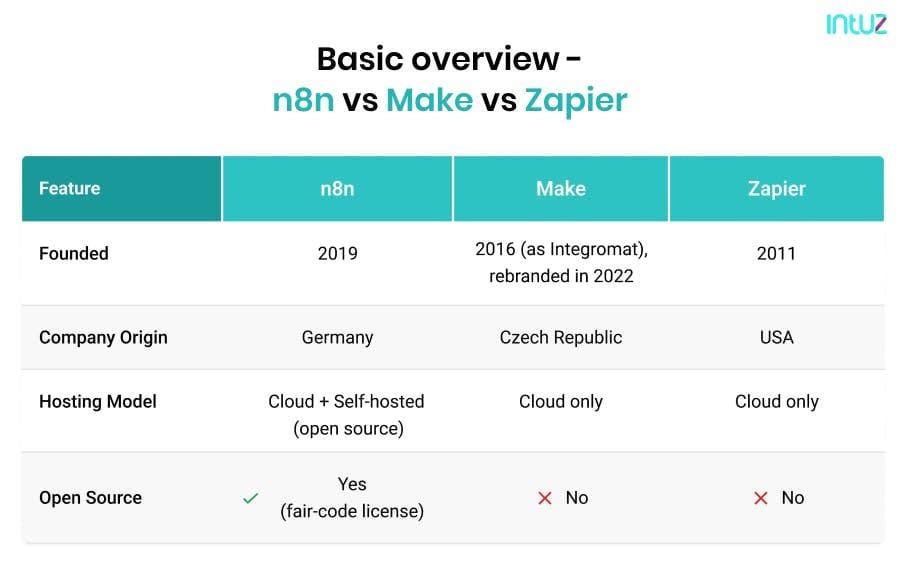
First, a quick disambiguation — because the word “Make” trips up search engines and humans alike. We’re talking about Make.com, the visual automation platform (formerly Integromat), not GNU Make the build tool, not Make: magazine for hardware tinkerers, and not the dictionary verb (which Merriam-Webster and the Cambridge Dictionary define as “to bring into being by forming, shaping, or altering material”). According to Make’s official platform site, the product “breaks down silos across your business” through visual scenario building.
Workflow automation platforms connect apps so data moves without manual copy-paste. A new Shopify order triggers an invoice in QuickBooks, posts to Slack, and adds the customer to a Mailchimp list — all untouched by human hands. Several published 2026 comparisons report SMEs reclaiming roughly 5 to 20 hours per week once core processes are automated; treat that as a directional range from secondary sources rather than a guaranteed outcome, since reclaimed hours depend heavily on which processes you automate and how manual they were before.
The three tools solve the same problem with radically different philosophies. Zapier sells simplicity. Make sells visual power at low cost. n8n sells control and ownership. Your right answer depends entirely on your budget, your team’s technical depth, and how complex your workflows get. We’ll break each down with real numbers below.
How do Make.com, n8n, and Zapier compare on 2026 pricing?
In 2026, Make.com is the cheapest at $9/mo, Zapier starts at $19.99/mo, and n8n cloud starts at $20/mo — but n8n is free when self-hosted. The critical difference is the pricing model: Zapier charges per task, Make charges per operation, and n8n charges per execution regardless of complexity.
These figures are corroborated across multiple independent 2026 comparisons, including Cipher Projects’ analysis (“n8n from $20/mo or free self-hosted, Zapier from $19.99”) and Digital Applied’s 2026 comparison. Because vendor pricing pages change without notice, confirm current tiers directly with each provider before committing.
Pricing model matters more than the headline number. Zapier counts every individual action as a “task,” so a workflow with 10 steps consumes 10 tasks per run. Make counts “operations” similarly but packs far more into each tier — its $9 Core plan includes 10,000 operations. n8n’s killer advantage: when self-hosted, you pay only for the server (often $5–$20/mo on a basic VPS like Hetzner or DigitalOcean) and run unlimited workflows.
Worked example: the $200 vs $8 math, shown transparently
The headline gap deserves the actual arithmetic rather than a round, unsourced figure. Consider a workflow that runs 50,000 times a month with a single billable action per run:
- Zapier (per task): 50,000 runs × 1 task = 50,000 tasks/month. That volume sits well above Zapier’s mid-tier task allowances, pushing you into higher Professional/Team brackets. At roughly the per-task economics those tiers imply, a workload at this scale commonly lands in the low-hundreds-of-dollars-per-month range — the source of the “$200” estimate. The exact figure depends on which tier you land in, so price it against your real run count on Zapier’s live pricing page.
- n8n (self-hosted, flat): The same 50,000 executions run on a small VPS. A basic Hetzner or DigitalOcean instance capable of this load costs roughly $5–$20/mo — the source of the “$8” estimate — with no per-execution surcharge. The trade is that you absorb deployment, security patching, and uptime monitoring yourself.
- Make (per operation): If each run is one operation, 50,000 operations/month falls into a paid Make tier well below Zapier’s cost for the same volume, because Make bundles far more operations per dollar.
The honest caveat: real workflows rarely have exactly one billable step. A 5-step Zap multiplies the task count fivefold, while a self-hosted n8n flow of any step count still costs the same flat server fee. That is precisely why the gap widens as workflows get busier — and why you should run your own numbers, not ours.
| Factor | Make.com | Zapier | n8n |
|---|---|---|---|
| Starting price (2026) | $9/mo | $19.99/mo | $20/mo cloud · Free self-hosted |
| Pricing model | Per operation | Per task | Per execution (flat) |
| Integrations | ~2,000 | 7,000+ | ~1,000 + custom HTTP/code |
| Self-hosting | No | No | Yes (full control) |
| Learning curve | Moderate | Easy | Steep |
| Data privacy | Cloud only | Cloud only | On-premise possible |
| Built-in AI nodes | Yes | Yes | Yes (most flexible) |
| Best for | Budget + volume | Non-technical teams | Developers + privacy |
According to comparison testing published by WorkflowPick’s 2026 three-way analysis — which states it compares “real pricing at actual usage levels” — the price gap widens dramatically at scale, with Zapier’s per-task model running multiples more expensive than Make for identical workflows. The independent “honest comparison” published by VirtualUncle, whose authors note “we tested all three,” reaches a similar conclusion on per-task scaling. That’s the Zapier tax in plain numbers. Want to model your own spend? Our automation ROI calculator projects 12-month costs across all three platforms in under two minutes.
Which automation tool is best for small businesses in 2026?
For most small businesses in 2026, Make.com offers the best value — combining a $9/mo entry price with visual workflow building that non-developers can learn. Zapier suits teams that prioritize speed over cost, while n8n is the smart pick for technically capable teams wanting data ownership and unlimited scaling.
Choosing well comes down to three honest questions about your business. Do you have anyone technical on staff? What’s your monthly automation volume? How sensitive is the data you’re moving?
Choose Zapier if you want zero friction
Zapier is the fastest no-code automation platform for connecting apps without engineering help. With 7,000+ app integrations — the largest catalog in the industry — a typical office manager can build a lead-routing flow in around 15 minutes. The tradeoff is cost: Zapier’s per-task billing punishes high-volume operations. As a worked example, a marketing agency running 2,000 client automations monthly can see Zapier bills cross $300/mo where Make handles a comparable load for a fraction of that — the exact crossover depends on steps-per-run, so verify against your own volume.
Choose Make.com if you want power on a budget
Make.com is the value champion for budget-conscious automation. Its visual canvas handles branching logic, loops, and data transformation that would require custom code on competing platforms, and it generally delivers materially higher throughput-per-dollar than Zapier at comparable volumes. A common, repeatable outcome practitioners report is migrating a Zapier-heavy stack onto Make and cutting automation spend substantially — frequently in the 60–80% range — without losing workflows, provided scenarios are architected to minimise wasted operations. Treat that range as a typical observed result, not a guarantee; inefficiently built scenarios can erode the saving.
Choose n8n if you want ownership
n8n is the only platform here you can run entirely on your own infrastructure. For healthcare, finance, or any business handling regulated data, on-premise data control isn’t a luxury — it’s often a compliance requirement. Self-hosted n8n means your customer data never has to touch a third-party cloud. The cost is engineering time: someone has to maintain the server, handle updates, and fix breakages. A realistic migration story looks like this: a team moves a customer-data sync off a cloud tool to a self-hosted n8n instance over a few engineering days, eliminating the per-task bill but adding a recurring patching-and-monitoring responsibility. Curious whether your stack fits? Try our AI tool comparison finder.
Make.com vs n8n vs Zapier comparison 2026: which has the best AI capabilities?
In the Make.com vs n8n vs Zapier comparison 2026, n8n leads on AI flexibility, offering native LangChain integration and custom AI agent nodes. Make and Zapier both ship polished OpenAI and Anthropic Claude connectors, but they’re more constrained — better for simple AI tasks than for building genuine autonomous agents.
AI inside automation tools is no longer a gimmick. As of 2026, all three platforms let you drop GPT-4o, Claude, or Gemini into a workflow to summarize emails, classify support tickets, or draft responses. The difference is depth.
Zapier’s AI features — Zapier Agents and AI-powered Zaps — excel at “add intelligence to a simple flow” use cases. Classify an incoming email, then route it. Clean. Make offers similar AI modules with its visual edge, letting you chain an AI step into branching logic visually. n8n goes furthest: its AI Agent and LangChain nodes let you build multi-step reasoning agents with memory, tool use, and vector database connections to Pinecone or Qdrant.
Definitions, since these terms get blurred: a LangChain node exposes the LangChain framework’s chaining and agent primitives inside the visual editor; an AI Agent is a loop where a model decides which tools to call and when, rather than following a fixed path; a vector database (Pinecone, Qdrant) stores embeddings so an agent can retrieve relevant context — the foundation of retrieval-augmented generation. Stateful means the workflow remembers prior steps or messages; a plain Zap is stateless — each run starts fresh.
Here’s the blunt practitioner take: none of these platforms replaces a purpose-built AI agent for complex, stateful tasks. Drag-and-drop AI nodes are great for deterministic, single-step intelligence. But the moment you need an agent that maintains context across a 20-message customer conversation, queries your ERP, and makes conditional decisions, you’ve outgrown the visual builder. That’s the ceiling. We cover crossing it in our guide to custom AI agent architecture — and yes, that conclusion aligns with our commercial focus, so weigh it against your own complexity.
Beware the “AI sycophancy” trap, too. Off-the-shelf AI nodes default to agreeable, probabilistic outputs — the “yes-machine” problem. For business-critical decisions you want deterministic, auditable logic, not a model guessing what sounds nice. The broader industry direction is toward governed, auditable automation over black-box AI, which is exactly where stateless visual nodes are weakest.
What is the total cost of ownership for each platform?
Total cost of ownership (TCO) for automation platforms includes the subscription, build time, maintenance, and — for n8n — server and DevOps overhead. Zapier has the lowest hidden cost but highest subscription at scale; n8n has near-zero subscription but the highest engineering burden.
The sticker price lies. A “free” self-hosted n8n instance still costs you a developer’s time to deploy, secure, monitor, and patch. A “cheap” $9 Make plan can balloon if you architect inefficient scenarios that burn operations needlessly. Honest TCO accounting changes the math entirely.
- Subscription cost: The recurring monthly fee — lowest for self-hosted n8n, highest for high-volume Zapier.
- Build cost: Hours to design and test workflows. Zapier is fastest; n8n is slowest due to its steeper curve.
- Maintenance cost: Fixing broken flows when APIs change. All three need attention; n8n needs the most.
- Infrastructure cost: Server, security, and DevOps — unique to self-hosted n8n, roughly $5–$50/mo plus engineering hours.
- Migration cost: The painful, often-ignored cost of switching platforms later. Plan your ceiling early to avoid it.
Think of it like buying versus building a house. Zapier is a furnished rental — move in today, pay premium rent forever. Make is a well-priced condo with room to customize. n8n is land you build on — cheapest long-term, but you’re the contractor. To make TCO testable, sketch a simple 12-month table for your own case: (subscription × 12) + (build hours × blended rate) + (maintenance hours × rate) + infrastructure. Run it for all three at your projected volume; the platform that looks cheapest in month one frequently flips by month twelve.
The most common, repeatable mistake across SME deployments is optimizing for month-one cost instead of month-twelve total cost. A flow that’s cheap to build but expensive to run will quietly drain your budget for years — and because it’s a per-task or per-operation drip, it rarely triggers a budget review until it’s already large.
When should you skip these tools and build custom AI agents?
You should move beyond Make, Zapier, or n8n when workflows require persistent memory, complex conditional reasoning, deep ERP integration, or genuine autonomy. Off-the-shelf tools excel at linear “if-this-then-that” logic but hit a hard ceiling on stateful, multi-step intelligence.
Disclosure worth repeating here: building custom is what J. SERVO sells, so this section is where our bias is strongest. Read the warning signs below as a checklist you can verify against your own workflows, not as a nudge — most SMEs should stay on off-the-shelf tools far longer than vendors of custom work tend to suggest.
- Your workflow has 30+ steps and 10+ branches. Visual builders become unmaintainable spaghetti at this complexity.
- You need conversation memory. A WhatsApp support agent that remembers context across messages can’t live in a stateless Zap.
- You’re fighting the per-task bill. When automation volume makes Zapier or Make economically painful, custom can be cheaper — but only once volume is genuinely high; below that threshold off-the-shelf still wins on TCO.
- Deep ERP or database logic is required. Real business logic against your inventory, pricing, or accounting needs deterministic code.
- You need auditable, deterministic decisions. Regulated or high-stakes workflows can’t rely on probabilistic AI guesses.
A pragmatic, widely-used path is: prototype fast on Make or n8n, validate the process works, then re-platform only the logic-heavy parts into a custom AI agent or intelligent chatbot when volume or complexity justifies it. A representative pattern is a WhatsApp agent plus a custom ERP integration that would otherwise rack up large monthly per-task bills, run instead on owned infrastructure for a fraction of the recurring cost. The visual tools are excellent on-ramps — just don’t mistake the on-ramp for the destination, and don’t pay for a custom build until the off-the-shelf math actually breaks.
Actionable takeaways: picking your platform in 2026
Here’s a decision framework you can apply this week. Match your situation to the recommendation, then validate it against your own volume numbers before committing.
- Solo founder, non-technical, low volume: Start with Make.com at $9/mo. Best power-to-price ratio.
- Team values speed over cost: Zapier. Fastest results, largest app catalog, easiest handoff to non-developers.
- Technical team, privacy-sensitive data: Self-hosted n8n. Free, owned, unlimited — if you can maintain it.
- High-volume operations: Make or self-hosted n8n. Avoid Zapier’s per-task ceiling.
- Complex AI agents or ERP logic: Skip off-the-shelf. Build custom for determinism and control.
Whatever you choose, audit your real monthly volume before committing. Most overspend comes from picking a per-task tool for a high-volume job. Run the numbers, then decide.
The automation tool war of 2026 isn’t really about which platform wins — it’s about knowing when the platform stops winning for you. The smartest operators treat Make, Zapier, and n8n as stepping stones, not endpoints. Build fast, measure honestly, and own your stack before it owns your budget.
Frequently Asked Questions
Is n8n really free compared to Make.com and Zapier?
n8n is free when self-hosted on your own server, with no per-task or per-execution subscription fees. You only pay for hosting — typically $5–$20/mo on a basic VPS. The cloud version starts at $20/mo. The catch is engineering time: self-hosting requires technical skill to deploy, secure, and maintain.
Which is cheaper, Make.com or Zapier, in 2026?
Make.com is cheaper, starting at $9/mo versus Zapier’s $19.99/mo. The gap widens at scale because Zapier charges per task while Make’s $9 plan includes 10,000 operations. For high-volume workflows, independent comparisons report Make running multiples cheaper than Zapier for identical automation logic — verify against your own run count, as the exact factor depends on steps-per-run.
Can Make, Zapier, and n8n integrate with custom AI agents and ERP systems?
Yes. All three connect to custom systems via HTTP requests, webhooks, and APIs, with n8n offering the deepest flexibility through its code and custom-node support. Many businesses use these platforms as glue between off-the-shelf apps and custom-built AI agents or ERP systems before migrating heavier logic to fully custom solutions.
What is the main downside of Zapier’s pricing model?
Zapier’s main downside is per-task billing, which means every individual action in a workflow consumes a paid task. A 10-step workflow uses 10 tasks per run, so high-volume operations rack up costs fast — the “Zapier tax.” Make and self-hosted n8n avoid this with operation-based and flat pricing.
When should an SME build a custom AI agent instead of using these tools?
An SME should build a custom AI agent when workflows need persistent memory, complex conditional reasoning, deep ERP integration, or deterministic auditable decisions. Make, Zapier, and n8n excel at linear automation but hit a ceiling on stateful, multi-step intelligence — that’s when custom development delivers better economics and reliability. Below that threshold, off-the-shelf tools usually remain the better-value choice.
Sources & References
This comparison is grounded in the following vendor and independent sources, current as of June 6, 2026. Pricing and feature claims change frequently — confirm live figures on each vendor’s own pricing page before purchasing.
- Make — official AI Workflow Automation platform site
- VirtualUncle — Make.com vs Zapier vs n8n 2026: Honest Comparison (“we tested all three”)
- WorkflowPick — n8n vs Make.com vs Zapier (2026): real pricing at actual usage levels
- Cipher Projects — n8n vs Zapier vs Make 2026: Pricing, Features & Which to Choose
- Digital Applied — Zapier vs Make vs n8n 2026: Automation Comparison
- Merriam-Webster — definition of “make” (term disambiguation)
- Cambridge Dictionary — definition of “make” (term disambiguation)
- Make: magazine — unrelated “Make” brand (disambiguation)