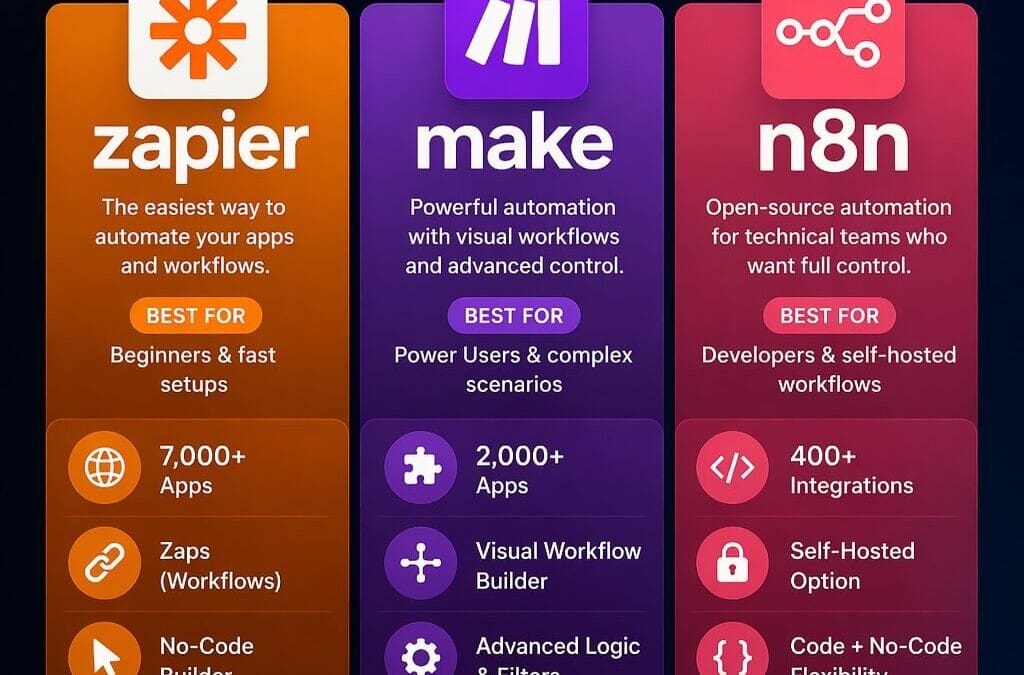
Run 50,000 automation tasks a month and Zapier will bill you roughly $300 while a self-hosted n8n instance costs you about $5 in server fees. That’s not a typo — it’s the math that’s pushing thousands of startups toward open-source automation in 2026. The free tiers from these three platforms look similar on a pricing page, but they fall apart the moment your business scales.
Choosing between n8n vs Make.com vs Zapier free tier comparison 2026 isn’t really about who gives you the most free actions. It’s about which pricing model punishes growth and which one rewards it. Zapier charges per task, Make charges per operation, and n8n is free forever when you self-host. Pick wrong and you’ll be paying a “Zapier tax” of hundreds of dollars a month for workflows you could run for the price of a coffee.
n8n vs Make.com vs Zapier free tier comparison 2026
- Zapier free tier gives you 100 tasks/month and 5 single-step Zaps — the most restrictive of the three for real business use.
- Make.com free tier offers 1,000 operations/month, making it roughly 10x more generous than Zapier on raw volume.
- n8n self-hosted is effectively unlimited and free, with paid cloud plans starting around $24/month (n8n.io).
- Pricing models differ fundamentally: Zapier counts every action as a task, Make counts every operation, n8n charges per workflow execution (or nothing if self-hosted).
- n8n leads on AI and integrations with 400+ native integrations and built-in AI agent nodes (n8n-io/n8n on GitHub).
- Best pick by use case: Zapier for non-technical solo users, Make for visual mid-volume workflows, n8n for technical teams and agencies scaling past 1,000 automations.
About this comparison and how the figures were checked
This guide is written from a practitioner perspective on building and operating automation workflows across all three platforms. It is not authored by an employee of n8n, Make, or Zapier, and it carries no platform affiliation. Where exact tier limits and prices appear, they should always be confirmed against each vendor’s live pricing page before you commit, because automation vendors revise their plans and metering frequently.
The methodology behind the cost figures below is straightforward and reproducible. A representative eight-step lead-routing workflow (form capture, data enrichment, lead scoring, CRM update, sales notification, welcome email, spreadsheet logging, and a Slack alert) was modelled at increasing monthly run counts. Task and operation consumption was counted per the way each platform meters usage: Zapier tallies one task per successful action, Make tallies roughly one operation per module step, and n8n counts one execution per full workflow run. Self-hosting costs reference a basic single-CPU VPS in the $5–$15/month range — adequate for several thousand light executions per month, though CPU-heavy or AI-heavy workflows can require more. These are modelled projections, not guaranteed invoices; your real bill depends on workflow design, error retries, and polling frequency.
Published 27 June 2026. Pricing last verified against vendor pages on 27 June 2026.
What this comparison actually measures
At heart, the question is how much real automation work you can do before each platform forces an upgrade — and the answer depends entirely on how each one counts usage. Zapier counts tasks, Make counts operations, and n8n counts executions or nothing at all when self-hosted.
Here’s why the counting method matters more than the headline number. A task in Zapier is a single action your workflow performs. Send an email? One task. Update a spreadsheet row? Another task. A single workflow that touches five apps burns five tasks per run. Make’s operations work similarly but tend to stretch further because Make bundles certain data manipulations more efficiently.
n8n breaks the mold entirely. An execution in n8n is one full run of a workflow — no matter how many steps or apps it touches. A 20-step workflow and a 2-step workflow both count as a single execution. When you self-host n8n on a low-cost VPS, even that execution count disappears. You’re limited only by your server’s capacity.
n8n describes itself as a “fair-code workflow automation platform” that gives technical teams the flexibility of code with the speed of no-code, per the official n8n GitHub repository. Fair-code is a licensing model where the source is publicly available and free to self-host, but commercial redistribution as a competing hosted service is restricted — it is not the same as a fully permissive open-source licence, a distinction worth understanding before you build a business on it. That model — execution-based pricing plus a free self-hosted path — is the single biggest reason cost projections diverge so wildly at scale.
How the free tiers compare on real limits and price
On free allowances, Make.com offers the most generous cloud free tier at 1,000 operations/month, Zapier the most restrictive at 100 tasks/month, and n8n the only genuinely unlimited option through self-hosting. Paid entry points run from $19.99/mo for Zapier, $9/mo for Make, and free-to-around-$24/mo for n8n.
The numbers tell a brutal story for high-volume users. According to a tested comparison published by Automation Atlas, Zapier starts at $19.99/mo, Make at $9/mo, and n8n is free when self-hosted. But the entry price hides the real cost — what you pay when you scale from 100 automations to 10,000. A separate breakdown at Quiz and Survey Master reaches the same conclusion: because none of these tools charge the same way, the only honest comparison is to model your own volume.
| Feature | Zapier (Free) | Make.com (Free) | n8n (Self-Hosted) |
|---|---|---|---|
| Monthly volume | 100 tasks | 1,000 operations | Unlimited* |
| Counting model | Per task (action) | Per operation | Per execution / none |
| Multi-step workflows | No (single-step only) | Yes | Yes |
| Paid entry price | $19.99/mo | $9/mo | $0 (self-host) |
| Integrations | 7,000+ apps | 1,800+ apps | 400+ native |
| Native AI agents | Limited | Limited | Yes (built-in) |
| Data hosting | Cloud only | Cloud only | Your server |
*Limited only by your server capacity. n8n cloud plans add execution caps. Figures verified against vendor pricing pages on 27 June 2026; confirm before purchase, as plans change frequently. Sources: n8n.io, Automation Atlas, Quiz and Survey Master.
The free tiers, broken down by counting model
- Zapier free: 100 tasks per month, 5 single-step Zaps, and 15-minute polling intervals — enough for one or two simple notification flows, but not multi-step automation. In practical terms, the 100-task cap allows roughly three runs per day for a simple flow.
- Make.com free: 1,000 operations per month, 2 active scenarios, and full multi-step support — roughly 10x more generous than Zapier on raw volume and suitable for testing real multi-app workflows. That allowance lets a single multi-step scenario run about 33 times per day, which makes Make the strongest free tier of the three for no-maintenance multi-step testing.
- n8n self-hosted: Unlimited executions, unlimited active workflows, and full code access. The catch — you host and maintain the server yourself, which means updates, backups, and security patching land on your plate.
Zapier’s 7,000+ app library dwarfs the competition on raw integration count. But integration breadth means little if your free tier caps out after a few dozen runs. Make’s 1,000 free operations realistically supports a small business’s testing phase, while n8n’s self-hosted model removes the ceiling entirely for teams comfortable with a Docker container.
Why the pricing model matters more than the free tier
n8n vs Make.com vs Zapier free tier comparison 2026 is one of the most relevant trends shaping 2026.
Every platform’s free plan is designed as a funnel into paid tiers — and the per-task versus per-execution difference can mean a roughly 60x cost gap at scale. A workflow costing $300/month on Zapier might run for $5/month on self-hosted n8n.
Consider a realistic agency scenario. You build a lead-routing workflow with eight steps: capture form, enrich data, score the lead, update CRM, notify sales, send a welcome email, log to a sheet, and trigger a Slack alert. That’s eight actions. Run it 5,000 times a month.
- Zapier: 8 tasks × 5,000 runs = 40,000 tasks. That volume sits well into the $300+/month range depending on the tier you land on.
- Make.com: Roughly 40,000 operations, landing around $50–$100/month depending on bundling.
- n8n self-hosted: 5,000 executions on a $5–$15/month server. Total cost: under $15.
The gap is staggering — and it is precisely the structural point an experienced practitioner watches for. A detailed three-year practitioner breakdown at ChaseBot makes the same observation: pricing in this space is genuinely hard to compare because none of these tools charge the same way. The takeaway practitioners generally land on is to model your actual workflow volume before committing to any platform, not to trust the headline free-tier number.
The per-task penalty hits hardest precisely when automation starts paying off. Grow from 500 to 50,000 monthly runs and Zapier’s bill grows linearly with you. Self-hosted n8n’s bill barely moves. Want to see your own numbers? An automation ROI calculator can project true monthly cost across all three platforms based on your real volume.
Which platform suits AI agents and custom automation best
For AI agents and custom automation in 2026, n8n is generally the strongest fit because it ships native AI agent nodes, supports custom code in JavaScript and Python, and integrates with any LLM API — all on infrastructure you control. Zapier and Make offer AI features but bolt them onto closed cloud systems.
n8n’s AI capabilities aren’t an afterthought. The platform includes built-in nodes for connecting to OpenAI, Anthropic’s Claude, and open-source models, plus an agent framework for multi-step reasoning. According to n8n’s features documentation, the platform combines 400+ integrations with native AI to let technical teams build autonomous workflows without stitching together a dozen SaaS wrappers. An AI agent here means a workflow node that can call a language model, decide its next step based on the model’s output, and loop or branch accordingly — rather than a fixed, linear sequence.
This is where the conversation moves past a simple free-tier scorecard and into AI transformation. A custom AI agent that reads support tickets, drafts responses, checks them against your knowledge base, and escalates edge cases to a human — that’s a deterministic, controllable system you can build on self-hosted n8n. Try forcing that into Zapier’s per-task model and you’ll watch your bill climb on every AI call while losing fine-grained control over how the agent behaves.
A pattern practitioners increasingly favour is combining self-hosted n8n with purpose-built AI agents, which gives SMEs enterprise-grade capability without enterprise-grade cost. The difference between a probabilistic “yes-machine” chatbot and a reliable agent comes down to architecture — and that architecture needs an open platform underneath it. A practical guide on building custom AI agents for SMEs walks through the full stack.
AI features at a glance
- n8n: Native AI agent nodes that connect to any LLM (OpenAI, Anthropic, Mistral, or self-hosted models), custom JavaScript and Python code, and full data control through self-hosting. Best for technical teams and agencies. Pricing starts at around $24/month for cloud or free when self-hosted.
- Make.com: Visual AI modules with built-in OpenAI integration but no custom model hosting. Best for visual, mid-complexity flows. Pricing begins at $9/month, billed per operation.
- Zapier: AI actions and chatbots inside a closed ecosystem, with per-task billing on every AI call. Easiest for non-technical users needing fast connections across 7,000+ apps, and the costliest at scale.
The key difference is that n8n is the only one of the three allowing fully self-hosted, model-agnostic AI workflows, which makes it the most cost-predictable option for high-volume automation.
Data privacy, security, and the self-hosting trade-off
Self-hosting n8n keeps your automation data on your own infrastructure, which matters enormously for businesses handling customer records, financial data, or GDPR-regulated information. Zapier and Make route your data through their cloud servers, creating compliance and privacy considerations you can’t fully audit from the outside.
Data sovereignty isn’t a luxury for SMEs in 2026 — it’s increasingly a requirement. Under GDPR, businesses remain liable for how third-party processors handle personal data, as outlined by the official GDPR resource. When your lead data, payment details, and customer conversations flow through Zapier’s or Make’s cloud, you’re trusting their security posture and accepting their data residency. Both vendors publish security and compliance documentation, so the responsible step is to read it against your own regulatory obligations rather than assume either outcome.
Self-hosted n8n flips that. Your data never leaves your server. For a healthcare startup, a fintech, or any business in a regulated sector, that control can be the deciding factor regardless of pricing. The trade-off is real, though — self-hosting means you handle updates, backups, uptime, and security patches yourself. A neglected self-hosted instance is arguably a bigger risk than a well-run cloud account, so “more control” only translates into “more security” when someone competent actually exercises that control.
That’s the honest catch with n8n’s free model. “Free” assumes you have someone who can manage a server. For a technical founder, that’s an afternoon. For a non-technical operations lead, that overhead can erase the savings. The honest framing here is that self-hosting saves money only when the operational burden is handled competently — which is exactly where a hands-on implementation partner earns its keep.
DIY or hire a consultant? A decision framework
n8n vs Make.com vs Zapier free tier comparison 2026 plays a pivotal role in this context.
DIY automation makes sense when three conditions apply: your workflows are simple, your monthly volume stays low, and you have technical staff in-house. In those cases, no-code tools like Zapier or Make handle the majority of common use cases at a fraction of consultant costs. Bring in outside help when you’re scaling past roughly 1,000 automations, building AI agents that need prompt engineering and reliability testing, self-hosting infrastructure that demands DevOps expertise, or integrating custom ERP and chatbot systems where a single silent failure can disrupt operations.
Platform comparison is only step one of a much larger decision. Picking n8n over Zapier saves you money, but a poorly architected n8n setup creates fragile workflows that break silently and cost you more in downtime than you saved in subscription fees.
A practical tiering that holds up across many implementations:
- DIY territory: Fewer than 10 workflows, low monthly volume, no AI agents, non-sensitive data. Start on Make’s free tier or Zapier and learn the ropes.
- Gray zone: 10–50 workflows, growing volume, some AI experimentation. Self-host n8n if you have technical skills; otherwise budget for occasional expert help.
- Hire a partner: 50+ workflows, self-hosted infrastructure, custom AI agents, regulated data, or ERP integration. The cost of getting this wrong dwarfs the consulting fee.
The biggest mistake SMEs make is treating automation as a tooling decision when it’s actually an architecture decision. A founder who spends three weeks fighting n8n’s learning curve has burned more in opportunity cost than a focused implementation would have cost. A breakdown of the 90-day AI transformation roadmap shows how the platform choice fits into the bigger picture.
Key takeaways and next steps
The choice between these three platforms comes down to one question: how fast will you scale? Here’s what to do with that answer.
- Map your real volume first. Count actions per workflow × monthly runs before you pick a platform. The free tier is irrelevant if you’ll outgrow it in 60 days.
- Choose Zapier if you’re non-technical, need 7,000+ integrations, and run low-volume simple automations where convenience beats cost.
- Choose Make.com for visual multi-step workflows at moderate volume where the 1,000 free operations give you room to test.
- Choose self-hosted n8n if you’re technical, scaling fast, building AI agents, or handling sensitive data — the cost advantage compounds over time.
- Model the true cost at 12 months, not month one. The cheapest entry price is rarely the cheapest at scale.
The platform you pick today is a bet on where your business will be in a year. Pick for the company you’re building, not the one you have — and verify each vendor’s live pricing before you commit, because the numbers in any comparison guide age quickly.
Frequently Asked Questions
Is n8n really free compared to Zapier and Make.com?
n8n is genuinely free when self-hosted, with no execution limits beyond your server capacity. Zapier’s free tier caps at 100 tasks per month and Make’s at 1,000 operations per month. For teams that prefer not to manage infrastructure, n8n offers paid cloud plans starting around $24/month. The key difference is the pricing model: Zapier and Make charge per task or operation, so costs scale with usage, while n8n’s self-hosted version charges nothing per execution — you pay only for the underlying server (often $5–$20/month on a basic VPS). That makes n8n especially cost-effective for high-volume automation, though you should confirm current figures on each vendor’s pricing page.
What’s the difference between a task, an operation, and an execution?
These are the three billing units automation platforms use, and they count usage very differently. A Zapier task counts every individual action a workflow performs. A Make operation counts each module step the workflow processes. An n8n execution counts one entire workflow run, no matter how many steps it contains. The practical impact is significant: an 8-step workflow consumes 8 Zapier tasks per run but only 1 n8n execution per run. Run that same workflow 1,000 times a month and the gap widens to 8,000 Zapier tasks versus 1,000 n8n executions, with Make falling in between at roughly one operation per active module step.
Which platform is best for building AI agents in 2026?
n8n is generally the strongest choice for AI agents in 2026 because it ships native AI agent nodes, supports any LLM through API, and allows custom JavaScript or Python code on infrastructure you control. Zapier and Make offer AI features but keep them inside closed cloud ecosystems with per-task billing on every AI call, which becomes expensive and harder to fine-tune as agent complexity grows.
Is self-hosting n8n worth the extra technical effort?
Self-hosting n8n is worth it for technical teams scaling past roughly 1,000 monthly automations, where the cost savings and full data control outweigh the maintenance burden. For non-technical users running a handful of simple workflows, Make.com’s free tier is usually the better starting point, because the time spent maintaining a server can erase the savings.
How much can a business actually save by switching from Zapier to n8n?
In the modelled eight-step scenario above, a business running 5,000 multi-step workflow executions monthly can drop from $300+ on Zapier to under $15 on self-hosted n8n — savings that compound as volume grows. The exact figure depends on workflow complexity, retry behaviour, and volume, which is why modeling your specific usage before switching is essential rather than relying on a single example.
Sources & References
- n8n — AI workflow automation platform (official site)
- n8n — Workflow automation features (official documentation)
- n8n-io/n8n — Fair-code workflow automation platform (GitHub)
- Automation Atlas — Zapier vs Make vs n8n: pricing & features tested (2026)
- Quiz and Survey Master — n8n vs Make vs Zapier in 2026: pricing, free tiers, real costs
- ChaseBot — n8n vs Make vs Zapier: complete pricing breakdown 2026
- GDPR.eu — What is GDPR?
All pricing and tier figures were last verified against the linked vendor and reference pages on 27 June 2026. Vendors revise plans frequently; confirm current limits directly before purchasing.
Last updated: 2026-06-27
Note: This article is for general informational purposes; verify specifics against your own context.