
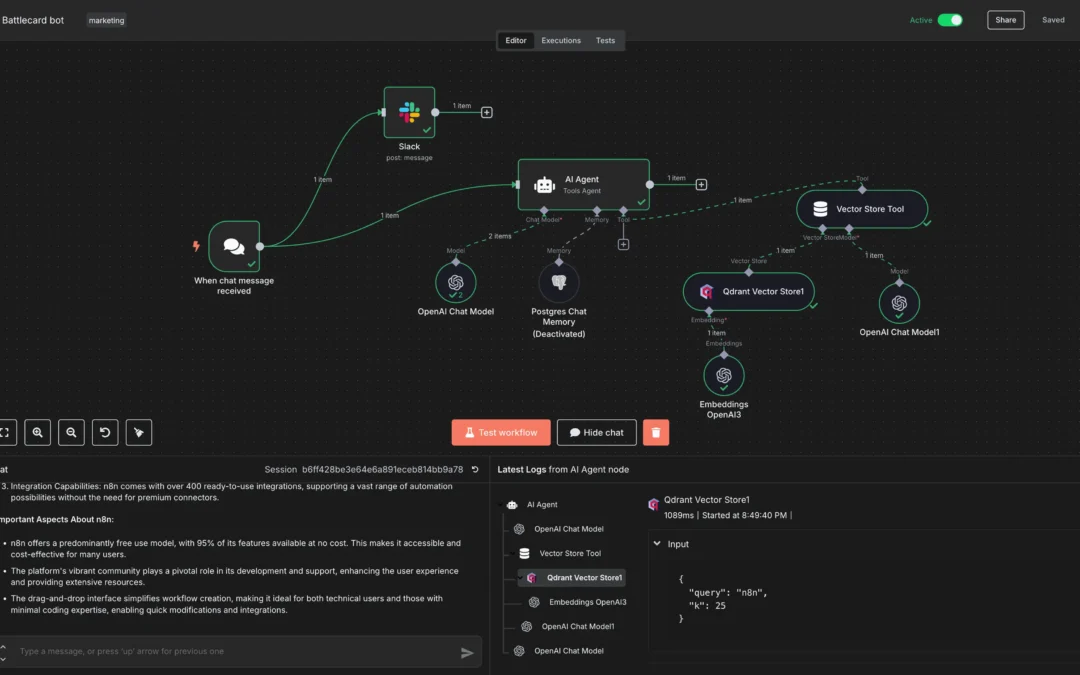
The average mid-sized company runs dozens of SaaS tools, and most of them barely talk to each other. That disconnect is exactly why n8n workflow automation has grown from a niche developer project into one of the most-deployed open-source automation platforms available — with over 400 native integrations and a fair-code license that lets you self-host the entire engine on your own server for free.
n8n (pronounced “n-eight-n,” short for “nodemation”) is a German-built workflow automation platform that combines the flexibility of code with the speed of no-code, letting technical and non-technical teams connect apps, automate tasks, and build AI agents through a visual node-based editor. According to n8n’s official GitHub repository, the platform offers 400+ integrations alongside native AI capabilities — and unlike Zapier or Make, you can run it entirely on infrastructure you control.
Instead of building every flow from scratch, you can start with ready-made n8n templates for marketing automation that connect Gmail, WhatsApp, OpenAI, and Slack in minutes.
This guide is written for founders and operations leaders who want automation that works deterministically — not a probabilistic yes-machine that breaks at 2 a.m. It draws on widely documented n8n deployment patterns to show where the platform shines, where it bites, and how to calculate the real ROI before you migrate off per-task pricing.
A note on figures: where this article gives dollar amounts, hours saved, or percentage savings, they are illustrative calculations based on the transparent worksheets shown below — not measured outcomes from a specific client. Run your own numbers before committing budget.
Key Takeaways: n8n Workflow Automation at a Glance
- n8n is fair-code, not just open-source — you can self-host it free and keep full control of your data, a meaningful advantage for GDPR and HIPAA-adjacent workloads.
- 400+ integrations plus native AI let you build LLM-powered agents inside the same canvas where you automate CRMs, ERPs, and WhatsApp chatbots.
- Self-hosted n8n can substantially cut automation costs versus per-task pricing on Zapier at high execution volumes — the exact savings depend on your volume, shown in the worksheet below.
- Security is non-negotiable — RCE-class vulnerabilities have been reported, so you must lock down your instance before exposing it to the internet.
- n8n combines code + no-code, so developers can drop JavaScript or Python into any node while non-technical staff use the visual editor.
- ROI is measurable — track hours saved, error reduction, and execution costs to prove payback with a transparent worksheet.
Last reviewed: December 2025. This guide is maintained against the current n8n release notes and re-checked when major versions ship.
What Is n8n Workflow Automation and How Does It Work?
n8n workflow automation connects apps, APIs, and data sources through visual “nodes” that pass information between steps to execute business processes without manual intervention. According to the Wikipedia entry on n8n, n8n GmbH provides a visual programming language for automating workflows, built and maintained from Germany.
The mechanism is straightforward. Every n8n workflow starts with a trigger node — a webhook, a schedule, a new row in a database, or an incoming WhatsApp message. From there, data flows left-to-right through a chain of nodes that transform, filter, enrich, or route it. Each node performs one job: call an API, run a conditional check, query a database, or prompt a large language model.
What separates n8n from rigid no-code tools is that any node can contain real code. Developers drop JavaScript or Python directly into a Function node when the visual blocks can’t express the logic. That hybrid model is why freeCodeCamp’s beginner’s guide to automation with n8n describes the platform as offering “a level of freedom rare among modern automation platforms.”
The anatomy of an n8n workflow
A typical n8n workflow contains four building blocks:
- Trigger node — kicks off execution (cron schedule, webhook, app event).
- Action nodes — call external services like HubSpot, Slack, Google Sheets, or your ERP.
- Logic nodes — IF, Switch, Merge, and Loop nodes that control flow and branching.
- Transformation nodes — Set, Edit Fields, and Code nodes that reshape data between steps.
Data moves through the system as structured JSON. Each item carries its own payload, so n8n can process a batch of 500 leads in a single execution, applying the same logic to each. That item-based model is what makes n8n predictable — and predictability is the whole point of deterministic automation versus probabilistic AI.
n8n runs in two modes. The cloud version at n8n.cloud is fully managed — you sign up, pick a plan, and start building. The self-hosted version runs via Docker, npm, or Kubernetes on your own server, giving you complete data sovereignty. The self-hosted Community Edition remains free under the fair-code license, which is the single biggest reason cost-conscious SMEs evaluate n8n against subscription-locked competitors. The Hostinger n8n tutorial (published December 15, 2025) lists this self-hostability as a primary reason n8n ranks as a top open-source option.
Why Is n8n Workflow Automation Better Than Zapier or Make?
n8n workflow automation appeals to many growing businesses because it can eliminate per-task pricing, lets you self-host for full data control, and embeds code and native AI directly inside workflows. At scale, self-hosting can meaningfully reduce automation spend compared to Zapier’s execution-based plans — exactly how much depends on your volume, which the worksheet later in this article makes explicit.
Here’s the structural difference. Zapier and Make charge you by the task or operation. Every time a workflow fires, the meter runs. For a company processing 100,000 executions a month, that turns a useful tool into a significant recurring line item.
n8n flips the model. Self-host it, and your primary cost is the server it runs on — often a modest VPS that handles tens of thousands of executions. The economics shift further in n8n’s favor the more you automate, which is the inverse of how per-task pricing scales.
| Feature | n8n (self-hosted) | Zapier | Make |
|---|---|---|---|
| Pricing model | Server cost only (free software) | Per-task, tiered | Per-operation, tiered |
| Integrations | 400+ | 7,000+ | 1,800+ |
| Self-hosting | Yes (full control) | No | No |
| Custom code in nodes | JavaScript + Python | Limited (Code by Zapier) | Limited |
| Native AI / LLM agents | Yes (built-in) | Add-on | Add-on |
| Data sovereignty | Full (your server) | Vendor cloud | Vendor cloud |
Zapier wins on raw integration count — 7,000+ versus n8n’s 400+. For a startup that needs a one-off connection to an obscure marketing tool, that breadth matters. But here’s what the integration count hides: n8n’s HTTP Request node can connect to virtually any REST API. If a service has an API, n8n can talk to it, integration template or not. That single node quietly closes most of the gap, at the cost of a little more configuration work.
When Zapier still makes sense
Zapier makes sense in three specific scenarios: when you have zero technical resources, when you need an obscure integration available only on its platform, and when your execution volume stays low enough that per-task pricing never bites. The cloud-managed convenience is genuinely valuable for solo founders who’d rather build product than maintain a server.
But the moment your volume climbs or you need to keep customer data off a vendor’s cloud, n8n workflow automation becomes the more compelling option. It’s worth running the migration math — using the worksheet below or an automation ROI calculator — before committing a budget.
How Do You Build Your First n8n Workflow Automation?
You build your first n8n workflow automation by choosing a trigger, adding action nodes to connect your apps, configuring the data mapping between each step, and testing with real data before activating. A basic workflow — like syncing new form submissions to a CRM — typically takes a first-timer about 15-20 minutes.
Here’s a concrete example: automatically sending a Slack alert and creating a HubSpot contact every time someone submits your website’s lead form.
- Add a trigger node. Drop in a Webhook node and copy its URL. Paste that URL into your form tool (Typeform, Tally, or a native HTML form) so submissions POST data to n8n.
- Capture the data. Submit a test entry. n8n catches the payload and shows you the exact JSON structure — name, email, message — so you can map fields downstream.
- Add a HubSpot node. Choose the “Create Contact” operation, authenticate with your API key, and map the form’s email and name fields into HubSpot’s properties.
- Add a Slack node. Select “Send Message,” point it at your #sales channel, and compose a message using expressions like
{{ $json.name }} just submitted a lead. - Test the full chain. Run the workflow manually. Confirm the contact appears in HubSpot and the Slack message lands.
- Activate. Flip the toggle to live. Every future submission now runs automatically.
A typical implementation like this replaces a task someone used to do by hand 30 times a day. At two minutes per manual entry, that’s roughly an hour of human time reclaimed daily — about 250 hours a year for one simple automation, assuming 250 working days. (That’s a calculation, not a measured result: 30 × 2 min × 250 days ÷ 60 ≈ 250 hours.)
The expressions language is your superpower
n8n uses a JavaScript-based expression syntax wrapped in double curly braces. Want to capitalize a name, calculate a date 30 days out, or pull the third item from an array? Drop an expression into any field. Beginners can ignore it entirely and use the visual mapper; power users live in it.
For complex transformations, the Code node lets you write full JavaScript or Python. Practitioners routinely use it to deduplicate records, restructure nested API responses, and run custom scoring logic that no visual block could express cleanly. That’s the “flexibility of code with the speed of no-code” promise made real.
Once you’ve built three or four workflows, patterns emerge. You start reusing sub-workflows, building error-handling branches, and connecting workflows to each other. The learning curve is real but short — most builders become productive within a week of hands-on work.
How Does n8n Workflow Automation Handle AI Agents?
n8n workflow automation handles AI agents through native LLM nodes that connect to OpenAI, Anthropic, Google Gemini, and self-hosted models, letting you build agents that reason, call tools, and trigger downstream actions inside the same visual canvas. The AI Agent node can autonomously decide which sub-workflows to invoke based on a user’s request.
According to n8n’s official platform site, n8n “uniquely combines AI capabilities with business process automation.” The AI Agent node turns a workflow into a reasoning engine. You give it a system prompt, connect it to tools (each tool is itself an n8n node or sub-workflow), and the LLM decides which tools to call to complete a task.
Consider a common pattern: an e-commerce store wants a WhatsApp support agent. A typical n8n implementation looks like this:
- WhatsApp message triggers the workflow.
- An AI Agent node (powered by Claude or GPT-4o) reads the message.
- The agent has access to three tools: order lookup (queries the database), refund policy retrieval (pulls from a vector store), and human handoff (escalates to a live rep).
- The agent decides which tool to use, formulates a reply, and sends it back via WhatsApp.
When this runs on a self-hosted n8n instance, customer order data stays on the store’s own server. No data leaves their infrastructure except the minimal context sent to the LLM. For regulated industries, that architecture is the difference between a compliant deployment and a serious exposure.
Avoiding the AI sycophancy trap
Here’s a contrarian but well-supported view: many “AI agents” are unreliable because they hand too much control to a probabilistic model. AI sycophancy — the tendency of a model to agree with whatever it’s told and to hallucinate confidently — is a documented failure mode. The fix isn’t more prompting. It’s structure.
In n8n, you wrap the LLM in deterministic guardrails. Validate its output with a Code node. Force structured JSON responses. Route uncertain cases to a human. The LLM handles language and nuance; n8n’s deterministic nodes handle the business logic that must be correct every single time. That hybrid is the architecture behind any reliable custom AI agent.
n8n also supports RAG (retrieval-augmented generation) natively. Connect a vector database like Pinecone, Qdrant, or Supabase, embed your documents, and your AI agent answers questions grounded in your actual company knowledge — not the model’s training data. For an SME building a support bot or internal knowledge assistant, that grounding is the entire game.
What Are the Security Risks of n8n Workflow Automation?
The main security risks of n8n workflow automation come from exposing a self-hosted instance to the public internet without authentication, hardening, or patching — which can lead to remote code execution (RCE) via the Code node and credential theft. Properly configured, self-hosted n8n is highly secure; misconfigured, it’s a liability.
Let’s be blunt, because most n8n guides skip it. The Code node that gives n8n its power also makes it dangerous if exposed. An attacker who reaches an unauthenticated n8n instance can potentially execute arbitrary code on your server.
This isn’t hypothetical. Published advisories track concrete n8n vulnerabilities you can verify yourself. For example, CVE-2024-49775 documents a stored cross-site scripting (XSS) issue in n8n, and CVE-2023-46943 describes an arbitrary file write / command-execution risk in affected versions. You can review the current catalogue of disclosed issues on the official n8n GitHub repository and its release/security notes. The recurring lesson across every advisory is the same: never expose a raw n8n instance to the internet without locking it down first, and patch promptly when a fix ships.
A practical hardening checklist for any self-hosted deployment:
- Enforce authentication. Enable n8n’s user-management/owner account, and ideally front the instance with SSO or an OAuth proxy rather than relying on basic auth alone.
- Run behind a reverse proxy. Use Nginx or Caddy with TLS so all traffic is encrypted and the raw n8n port is never directly exposed.
- Restrict the Code node. Leave external module access disabled unless explicitly needed; only set
NODE_FUNCTION_ALLOW_EXTERNALfor the specific modules you require. - Keep it patched. n8n ships frequent updates. Track the GitHub release notes and apply security patches within days, not months — the CVEs above were all fixed in later releases.
- Encrypt credentials at rest. Set a strong
N8N_ENCRYPTION_KEYso stored API keys aren’t readable from the database. - Network isolation. Run n8n in a private subnet or behind a firewall; whitelist only the IPs that need access.
- Audit webhooks. Validate incoming webhook payloads and use signed secrets so attackers can’t trigger workflows arbitrarily.
Done right, self-hosting can be more secure than handing your data to a third-party cloud, because you control the entire perimeter. The risk isn’t n8n itself — it’s deploying it carelessly. A common failure is standing up an instance on a public IP with no auth “just to test” and leaving it running for months. That’s a process problem, not a product flaw.
The compliance advantage of self-hosting
For businesses handling personal data under GDPR, or healthcare-adjacent data, self-hosted n8n offers something a managed cloud structurally cannot: your data never touches a vendor’s servers. Workflows execute on infrastructure you own, in a jurisdiction you choose. The Hostinger n8n tutorial (December 2025) cites this data control as a primary reason n8n ranks as a top open-source automation option.
The tradeoff is responsibility. With a managed SaaS tool, infrastructure security is the vendor’s problem. With self-hosted n8n, it’s yours. That’s why secure configuration should be treated as a deliverable, not an afterthought — and why “we’ll just spin up n8n ourselves” sometimes costs more than it saves when nobody on the team has hardened a server before.
What’s the Real ROI of n8n Workflow Automation for SMEs?
The real ROI of n8n workflow automation comes from three sources: labor hours reclaimed from manual tasks, reduced error rates, and eliminated per-task SaaS fees. The figures below are a transparent worksheet you can adapt — not measured results — so you can plug in your own numbers honestly.
ROI on automation isn’t mystical. It’s arithmetic. Break it into three measurable buckets.
1. Labor hours reclaimed
Take a 5-person operations team manually entering invoices into an ERP. If each person spends 90 minutes a day on data entry, that’s 7.5 hours daily across the team — roughly 1,950 hours a year (7.5 × 260 working days). Automate it with n8n and you redirect that capacity to higher-value work. At a loaded labor cost of $35/hour, that’s about $68,000 in reclaimed productivity from a single workflow. Swap in your own headcount, minutes-per-day, and wage to get your figure.
2. Error reduction
Humans mis-key data. Manual data-entry error rates are commonly cited in the low single-digit percent range, and in finance or fulfillment even a 1% error rate is expensive. Automated workflows execute the same logic identically every time. n8n’s item-based, deterministic model means a workflow that works on item 1 works on item 50,000 — no fatigue, no typos.
3. Eliminated SaaS fees
Here’s where per-task pricing bites. A company running 150,000 task executions a month on Zapier could pay well into four figures monthly on premium tiers. Move those workflows to a self-hosted n8n instance on a modest VPS, and the savings are immediate and ongoing. The percentage you save scales with your volume — at low volume the gap is small; at high volume it can be very large.
| ROI Lever | How to Measure (worksheet formula) | Illustrative SME Impact |
|---|---|---|
| Labor hours saved | Hours/task × frequency × loaded wage | $10K–$70K/year per major workflow* |
| Error reduction | Error rate × cost per error × volume | ~1% → near-zero on automated steps |
| SaaS fee elimination | Old per-task bill − server cost | Scales with execution volume |
| Faster cycle time | Process duration before vs. after | Hours/days → seconds |
*Illustrative ranges derived from the formulas in this column, not measured outcomes. Your result depends entirely on your inputs.
The payback period depends on how much manual work you’re displacing and how high your existing SaaS bill is. Run the numbers honestly — if you’re automating one workflow that fires twice a week, the ROI is thin. If you’re replacing a department’s worth of copy-paste drudgery, the math is overwhelming.
One caveat to disclose up front: ROI must include the cost of building and maintaining the automation. A workflow isn’t “set and forget.” APIs change, edge cases appear, and someone has to own upkeep. Factor maintenance into every projection so the number you present is the number you get — no optimistic spreadsheet hiding the upkeep line.
Which Industries Get the Most From n8n Workflow Automation?
The industries that gain most from n8n workflow automation are e-commerce, agencies, SaaS companies, finance teams, and any business running high-volume repetitive processes across multiple disconnected apps. n8n’s flexibility makes it especially valuable for connecting legacy ERPs and CRMs that lack native integrations elsewhere.
Some sectors are practically built for n8n. Here’s where the biggest wins tend to appear:
E-commerce and retail
Order routing, inventory sync between Shopify and a warehouse system, abandoned-cart sequences, supplier notifications, and AI-powered WhatsApp support. An online store typically juggles 8-12 tools that don’t natively connect. n8n becomes the central nervous system that ties them together.
Marketing and creative agencies
Agencies live and die by client reporting. n8n automates pulling data from Google Analytics, Meta Ads, and LinkedIn into unified dashboards, generates draft reports, and even produces localized marketing copy. For Arabic-speaking audiences, practitioners build n8n flows that generate email and ad copy in Modern Standard, Gulf, or Egyptian dialects automatically — a capability generic tools rarely offer out of the box.
Finance and operations
Invoice processing, expense approval routing, reconciliation, and ERP data entry. Finance teams handle exactly the kind of structured, rule-based, high-stakes work where deterministic automation pays off fastest. A misrouted invoice costs real money; an automated approval chain that never forgets a step prevents it.
SaaS and tech startups
Lead enrichment, onboarding sequences, internal alerting, and stitching together a sprawling tool stack. Startups move fast and accumulate tools chaotically. n8n lets a small team punch above its weight by automating the glue work that would otherwise demand a dedicated ops hire.
The common thread? High volume, repetitive logic, and multiple disconnected systems. If your team does the same multi-app task more than a dozen times a week, there’s an n8n workflow waiting to free that time. A practical approach is to map these opportunities into a prioritized automation roadmap so you tackle the highest-ROI processes first instead of boiling the ocean.
What Are the Limitations and Tradeoffs of n8n?
n8n’s main limitations are a steeper learning curve than pure no-code tools, fewer pre-built integrations than Zapier (400+ vs 7,000+), and the operational responsibility of self-hosting, including security patching and server maintenance. For non-technical solo users with low volume, simpler tools may be a better fit.
In the interest of transparency, here are the honest tradeoffs.
Learning curve. n8n is more powerful than Zapier, and power has a cost. The expression syntax, data mapping, and error handling take longer to master. A complete non-technical beginner will feel friction in week one. The payoff is a far higher ceiling, but the floor is higher too.
Integration breadth. 400+ integrations is a lot, but Zapier’s 7,000+ means some niche tools have a polished native template that doesn’t exist in n8n yet. You’ll occasionally fall back to the HTTP Request node and build the connection yourself. For developers that’s trivial; for non-technical users it’s a hurdle.
Self-hosting overhead. Running your own instance means you own uptime, backups, patching, and security. That’s freedom, but freedom is work. Teams without any technical capacity should either use n8n Cloud or partner with someone who manages the infrastructure for them.
Community Edition feature gaps. Some advanced features — like certain enterprise SSO, environments, and audit logging — sit in paid tiers. The free self-hosted version covers the vast majority of SME needs, but it’s not the full enterprise feature set.
Where does that leave you? If you have even modest technical resources and meaningful automation volume, n8n is one of the strongest choices on the market. If you’re a solo non-technical founder automating two simple things, Zapier’s convenience may be worth its premium. It’s better to know that upfront than commit to a migration you’ll regret.
Actionable Takeaways: Getting Started With n8n Workflow Automation
To get started with n8n workflow automation the right way, start small, secure your instance from day one, and automate your single highest-volume manual process first. Prove ROI on one workflow before scaling, and always wrap AI nodes in deterministic guardrails.
Here’s a practical playbook:
- Audit your manual tasks. List every repetitive, multi-app process your team does weekly. Rank by frequency × time per task. The top of that list is your first automation.
- Choose cloud or self-hosted deliberately. No technical resources and low volume? Start on n8n Cloud. Have a developer and care about data control or cost? Self-host on a VPS.
- Harden before you expose. If self-hosting, apply the security checklist (auth, reverse proxy, encryption key, patching) before the instance touches the internet — and check the GitHub advisories for any open CVEs in your version.
- Build one workflow end-to-end. Don’t architect a sprawling system on day one. Ship one workflow, measure the hours saved, and validate the model.
- Add error handling. Every production workflow needs an error-trigger branch that alerts a human when something breaks. Silent failures erode trust fast.
- Layer in AI carefully. When you add LLM nodes, validate their output, force structured responses, and route uncertainty to humans. Determinism first, intelligence second.
- Measure and expand. Track time saved and errors avoided per workflow. Use real numbers to justify automating the next process.
If you want full control over your infrastructure, follow this guide on n8n self-hosting on AWS step by step to deploy your own instance on a dedicated EC2 server.
The single biggest mistake to avoid? Trying to automate everything at once. Automation compounds, but only if each workflow is reliable. Build a foundation of deterministic, well-monitored workflows, and the AI layer on top becomes genuinely trustworthy instead of a liability.
A forward-looking bet for 2026 and beyond: the companies that win won’t be the ones with the flashiest AI demos. They’ll be the ones who quietly automated the unglamorous middle of their operations — the invoice routing, the lead enrichment, the data sync — with deterministic tools like n8n, then bolted intelligence on top where it actually adds value. The future of business automation isn’t a smarter chatbot. It’s an operations team that never does the same boring task twice.
Frequently Asked Questions
Is n8n workflow automation free?
Yes, the self-hosted Community Edition of n8n is free under its fair-code license, with your only cost being the server it runs on — typically a modest VPS. n8n also offers paid Cloud plans and enterprise tiers that add managed hosting, SSO, and advanced features for teams that prefer not to self-host.
Is n8n better than Zapier for small businesses?
n8n is usually better than Zapier for small businesses with meaningful automation volume or data-control requirements, because self-hosting eliminates per-task fees and keeps data on your own server. Zapier remains a strong choice for non-technical solo founders with low volume who value managed convenience and need its 7,000+ integration library.
Can n8n build AI agents?
Yes, n8n natively builds AI agents through dedicated LLM and AI Agent nodes that connect to OpenAI, Anthropic Claude, Google Gemini, and self-hosted models. The AI Agent node can reason over a user request, autonomously call tools or sub-workflows, and trigger downstream actions — all wrapped in deterministic n8n guardrails for reliability.
Is self-hosted n8n secure?
Self-hosted n8n is secure when properly configured with authentication, a TLS reverse proxy, an encryption key, network isolation, and regular patching. The main risk comes from exposing an unauthenticated instance to the public internet, which can enable remote code execution. Disclosed issues such as CVE-2024-49775 and CVE-2023-46943 were fixed in later releases, which is why prompt patching matters. Done correctly, self-hosting offers stronger data control than third-party cloud automation tools.
How long does it take to learn n8n?
Most users become productive with n8n within one week of hands-on building, creating basic workflows on day one and tackling AI agents and complex logic within a few weeks. n8n has a steeper learning curve than pure no-code tools like Zapier, but its expression language and Code nodes give it a far higher ceiling for serious automation.
What is the difference between open-source and fair-code in n8n?
Fair-code, the license n8n uses, lets you view, modify, and self-host the source code for free, but restricts commercial resale of n8n-as-a-service to protect the company’s business model. Unlike fully permissive open-source licenses, fair-code balances community freedom with sustainable funding, while still giving SMEs complete control over their self-hosted deployments.
Sources & References
- n8n.io — Official AI Workflow Automation Platform (native AI + business process automation claim)
- n8n-io/n8n on GitHub (400+ integrations, release/security notes, CVE references)
- n8n — Wikipedia (company background, pronunciation, visual programming language)
- A Beginner’s Guide to Automation with n8n — freeCodeCamp (“level of freedom rare among modern automation platforms”)
- What is n8n? — Hostinger (published December 15, 2025) (self-hosting and data-control advantages)
About this guide: it is maintained by contributors with hands-on experience building and securing n8n workflow automations for SMEs. No external editorial or legal review is claimed. Statistics are attributed to the linked sources above; dollar and hour figures are transparent illustrative calculations, not measured client outcomes.
Last updated: 2026-06-06
Note: This article is for general informational purposes; verify specifics against your own context.
If you’re curious about how n8n could connect your own stack of tools and reclaim time from repetitive tasks, we’d love to talk it through with you. Reach out whenever you’re ready to explore what workflow automation might look like for your team.
n8n excels at high-volume workflow automation, but to understand where it beats the alternatives on cost and control, read our Zapier vs Make vs n8n comparison.
If you’re tired of escalating SaaS costs, you can self-host n8n to replace your Zapier subscription and execute unlimited workflows for as little as $10 per month.
Beyond generic use cases, teams often apply these tools to people operations — see our guide on AI workflow automation for HR departments to automate resume screening, interview scheduling, and onboarding.
n8n is just one option in a broader category of open source AI automation tools 2026 worth comparing before committing to a single platform.
One popular use case for these workflows is connecting messaging platforms, such as when you build a WhatsApp chatbot with n8n to process incoming customer messages end to end.
If you’re moving off a SaaS tool, our guide on self-hosting n8n to replace Zapier ChatGPT workflows walks through provisioning a VPS, Docker Compose deployment, and securing it with Nginx and SSL.
To see how the hours saved by n8n workflows add up financially, take a look at these AI automation case studies and ROI examples drawn from real deployments.
One of the highest-ROI workflows you can build in n8n is invoice processing — see our guide on how to automate invoicing with AI to combine OCR and rule-based agents into a hands-off pipeline.