
Most business AI failures aren’t model failures — they’re prompt failures. The clarity of the instruction you feed a model — its role, task, context, and required format — is a far bigger driver of output quality than which model you choose. Same GPT-4, same Gemini, same Claude. Different prompt, wildly different result. MIT Sloan Teaching & Learning Technologies frames prompt engineering as a way to “optimize your AI interactions” and “enhance output quality” — the model’s ceiling is fixed, but how close you get to it depends on the instruction.
Knowing how to write effective prompts for business AI is the difference between an assistant that drafts a usable proposal in 30 seconds and one that hands you 400 words of generic mush you have to rewrite anyway. The teams that get value from AI aren’t the ones with the biggest budgets — they’re the ones who learned to instruct the machine like they’d brief a sharp new hire.
Writing prompts that matters here. Even the best-written prompts can’t fully eliminate fabricated outputs, which is why teams should also learn how to reduce AI hallucinations in business workflows through architectural safeguards.
This guide breaks down the established frameworks, the copy-paste structure, and the SME-specific tactics that turn a vague chatbot into a more predictable business tool. It draws on publicly documented guidance from MIT Sloan, Google, Microsoft, Atlassian, and the practitioner community, cited inline throughout. Published and last reviewed: June 2025.
Writing prompts that: Quick Summary: Key Takeaways
- A prompt is an instruction set, not a search query — treat it like briefing a contractor, with role, task, context, and format.
- The four-part framework (Persona, Task, Context, Format) popularized by Google is the easiest starting point for non-technical teams.
- Microsoft’s GCSE model (Goal, Context, Source, Expectations) powers Copilot’s Prompt Coach and works well for document-grounded tasks.
- Specificity beats length: Atlassian (2024) recommends clear, detailed instructions kept concise — detail and brevity are not in conflict.
- Framework-first prompting — asking the AI to build a structure before writing — is a technique experienced practitioners use to reduce generic output.
- For SMEs, prompt templates by department (sales, finance, HR, marketing) help standardize quality across non-technical staff and reduce rework.
What does it mean to write effective prompts for business AI?
Writing effective prompts for business AI means giving an AI model a structured instruction that specifies who it should act as, what it must do, the context it needs, and the exact output format you expect. An effective business prompt is a deterministic brief, not a hopeful question. The clearer the brief, the more reliable and repeatable the result.
Think of the AI as a brilliant freelancer who started this morning. That freelancer knows nothing about your customers, your tone, your CRM, or your last quarter’s numbers. Hand them a one-line request — “write a follow-up email” — and you’ll get something technically correct and commercially useless. Hand them a role, a goal, supporting facts, and a format, and the output becomes usable on the first pass.
Google’s Gemini for Workspace guidance frames effective prompts as a way to “boost productivity and creativity” precisely because they remove ambiguity. MIT Sloan makes a similar point: prompt engineering is positioned as a core skill, not an optional extra, because the gap between a careful prompt and a careless one is large and consistent.
For SMEs, the stakes are practical. A founder doing the work of five people can’t afford three rounds of revision on every AI draft. Effective prompting collapses that loop. In a typical implementation, a sales team that moves from one-line requests to structured prompts finds the bulk of drafts become usable on the first attempt — not because the AI got smarter, but because the instruction did. We describe these as illustrative patterns, not guaranteed outcomes; the gain depends on the task, the model, and the quality of the context supplied.
How do you write effective prompts for business AI using a framework?
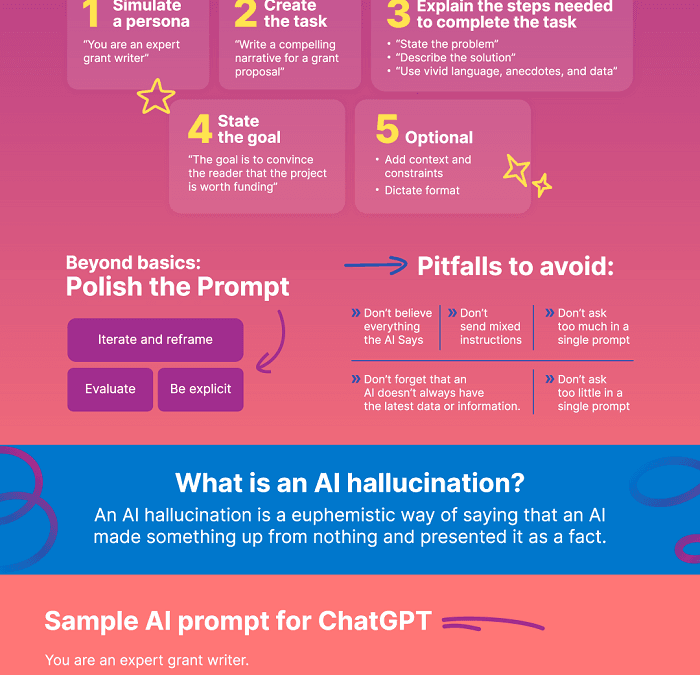
The fastest way to write effective prompts for business AI is to use a four-part framework: Persona, Task, Context, Format. Assign the AI a role, state the exact task, supply relevant background, and specify the output structure. This single pattern handles a large share of everyday business use cases.
The Persona/Task/Context/Format model was popularized through Google and detailed by writer Bryan Collins, who broke it into four essential parts in a June 2025 write-up of Google’s approach. Each part removes a specific kind of guesswork:
- Persona — tell the AI who to be. “Act as a B2B SaaS sales rep” produces sharper output than no role at all.
- Task — state the single action. “Write a three-paragraph follow-up email.”
- Context — supply the facts. The prospect’s industry, their objection, your product’s relevant feature.
- Format — define the shape. Bullet points, word count, tone, subject line included or not.
Here’s the same request, before and after.
Before: “Write a follow-up email.”
After: “Act as a SaaS account executive (Persona). Write a 120-word follow-up email to a prospect who went quiet after a demo (Task). They’re a 40-person logistics firm worried about implementation time; our onboarding takes 5 days (Context). Use a warm, confident tone, include a subject line, and end with one clear yes/no question (Format).”
The trade-off worth naming: the structured version takes perhaps 30 extra seconds to write. For a one-off, novelty request that overhead may not pay off. For any task you’ll repeat — which is most business writing — it pays back many times over and is worth saving as a template.
The framework-first technique that reduces generic output
One advanced move is widely reported by experienced users: ask the AI to build a framework before it writes the content. A power user on the r/PromptEngineering community (March 2025) described this as having the AI “reference or write a framework first, then use that framework to generate the content.” The output tends to stop sounding like every other AI-generated blob because the model commits to a structure before filling it.
Applied to business, you’d prompt: “Before writing our Q3 marketing plan, first outline the five sections a strong plan should contain, then fill each one using the context below.” The model self-organizes, and you catch structural gaps before they become a 2,000-word mistake. Our free AI prompt generator bakes this two-step logic into a single click for non-technical teams.
Which prompting framework is best: Persona/Task/Context/Format vs. GCSE?
Both frameworks work, but they serve different jobs. Persona/Task/Context/Format is best for creative and standalone tasks like emails, copy, and brainstorming. Microsoft’s GCSE (Goal, Context, Source, Expectations) is best for document-grounded tasks where the AI must work from a specific file or dataset.
GCSE is the model Microsoft built into Microsoft 365 Copilot’s Prompt Coach agent. The “Source” element is the key differentiator — it tells the AI which document, dataset, or system to pull from, which matters enormously when you’re working inside an ERP, a CRM, or a folder of contracts rather than generating from scratch.
| Element | Persona/Task/Context/Format (Google) | GCSE (Microsoft Copilot) |
|---|---|---|
| Origin | Google / Gemini for Workspace | Microsoft 365 Copilot Prompt Coach |
| Best for | Creative writing, emails, brainstorming, copy | Document analysis, summaries, data-grounded tasks |
| Key strength | Persona + Format control output style | “Source” grounds AI in real business data |
| Learning curve | Very low — intuitive for non-technical staff | Low, but assumes connected data sources |
| SME fit | Excellent for sales, marketing, support | Excellent for finance, ops, compliance |
So which should your team use? A practical recommendation: start with Persona/Task/Context/Format for everyone, then layer GCSE for any role that works from real documents. A marketing coordinator drafting social posts needs the first. A finance lead reconciling invoices against an ERP export needs the second. Forcing one framework on every department is exactly the kind of one-size-fits-all thinking that produces bloated, mismatched workflows — pick the tool that matches the task.
For teams running custom agents, frameworks alone aren’t enough. When you connect AI to a database, a payment system, or a WhatsApp inbox, your prompt becomes part of the architecture. Our work on custom AI agents and workflow automation treats the system prompt as a configuration file — versioned, tested, and locked down, not retyped from memory each morning.
Why does specificity matter more than prompt length?
Specificity matters more than length because AI models respond to precise constraints, not word count. A detailed, tightly-scoped prompt generally outperforms a vague, padded one. Atlassian’s 2024 guide explicitly recommends keeping prompts “concise and straightforward” while providing “clear and detailed instructions” — concise and detailed aren’t contradictions.
The mistake most teams make is confusing volume with clarity. Stuffing a prompt with adjectives — “write an amazing, engaging, professional, compelling email” — gives the model six fuzzy adjectives and zero hard constraints. Replace all six with one number and one rule — “120 words, one call-to-action” — and the output sharpens immediately.
Specificity works because of how language models predict. A large language model generates text by repeatedly estimating the most probable next token given everything before it. Each concrete detail you provide narrows the probability space the model samples from. Vague prompts leave the model to fill gaps with the statistical average of its training data — which is exactly why generic prompts produce generic, average-sounding text.
Here’s a practical rule worth teaching SME teams: every business prompt should answer four questions — who, what, with what facts, and in what shape. Miss any one and the model improvises. For repeatable tasks, save the winning prompt as a template so your team isn’t rediscovering specificity every single morning. Standardized prompts are how a five-person startup produces output that reads like it came from a much larger team.
How do you write effective prompts for business AI in different departments?
To write effective prompts for business AI across departments, build a reusable template for each function that pre-loads the persona and format, leaving only the task and context to fill in. Department-specific templates reduce the time spent composing each prompt and help standardize quality across non-technical staff.
Generic prompting advice ignores the reality that a finance prompt and a marketing prompt need completely different defaults. A finance prompt prioritizes accuracy, source-grounding, and verification. A marketing prompt prioritizes tone, brand voice, and persuasion. Here’s how the frameworks translate by function:
Sales and marketing prompts
Sales and marketing teams benefit most from the Persona/Task/Context/Format model. A high-performing sales prompt assigns the AE persona, names the prospect’s specific objection, supplies the relevant product proof point, and locks the format to a short email with one ask. For Arabic-speaking markets, the same structure applies with an added instruction specifying dialect — Modern Standard for formal B2B, Gulf or Egyptian for regional consumer campaigns.
Finance, HR, and operations prompts
Finance and operations teams should default to GCSE because their work is document-grounded. A finance prompt names the goal (“summarize variances”), the context (“month-end close”), the source (“the attached P&L export”), and the expectations (“flag any line over 10% off budget”). HR prompts follow the same pattern for policy drafting and candidate screening — always with a human approval step, because no responsible AI workflow auto-sends a hiring decision.
We’ve packaged these patterns into department-ready libraries because reinventing the prompt wheel in every team meeting is a tax on productivity. If you want to estimate the time and cost savings before you build, our AI ROI calculator models that against your headcount and task volume — treat its output as a planning estimate to validate against your own measured baselines, not a guarantee.
What mistakes ruin business AI prompts (and how to fix them)?
The most common mistakes that ruin business AI prompts are vagueness, missing context, no assigned role, and blind trust in the output. The fix for all four is structure plus verification — a clear framework upfront and a human check before anything ships.
Vagueness tops the list. “Help me with my presentation” gives the model nothing to anchor to. Missing context comes second — the AI doesn’t know your customer, your numbers, or your last conversation unless you tell it. Skipping the persona is the third quiet killer; without a role, the model defaults to a bland, corporate-neutral voice that fits no brand.
The fourth and most dangerous mistake is treating output as truth. Generative models can be fluent and confident even when wrong — a tendency sometimes called sycophancy, where the model agrees and elaborates rather than flagging uncertainty. A model can fabricate a statistic with the same fluency it uses for facts (often called hallucination). That’s why every business prompt workflow needs a verification layer, especially in finance, legal, and compliance. Both Atlassian and MIT Sloan’s guidance stress that AI output should be reviewed rather than trusted on sight.
- Fix vagueness — apply Persona/Task/Context/Format or GCSE before sending anything.
- Fix missing context — paste the relevant facts, document, or data into the prompt.
- Fix the missing role — always open with “Act as a [specific role].”
- Fix blind trust — require a named human to approve high-stakes output before it leaves the building.
Transparency isn’t optional here. The teams that scale AI safely are the ones that document which decisions the AI assists and which a human owns. Auditable, repeatable workflows beat impressive demos every time.
Your actionable prompt-writing checklist
Before you hit send on any business AI prompt, run this quick checklist. Knowing how to write effective prompts for business AI comes down to repeatable habits, not talent.
- Role assigned? Does the prompt open with “Act as a [specific role]”?
- Task singular? One clear action, not three stacked requests.
- Context supplied? The facts, numbers, or document the AI needs are included.
- Format locked? Word count, tone, and structure are specified.
- Verification planned? A human reviews before anything high-stakes ships.
- Template saved? If you’ll reuse it, store it so the team stops retyping.
Run those six checks and your output quality generally jumps on the first attempt. Skip them and you’re back to repeated revision rounds per draft — the silent tax that makes teams quietly conclude “AI doesn’t work for us” when the truth is their prompts didn’t.
The frontier isn’t better one-off prompts anymore — it’s prompts embedded into autonomous agents that run without a human typing each time. The businesses pulling ahead aren’t the ones with the cleverest single prompt. They’re the ones turning their best prompts into permanent, versioned infrastructure inside custom agents, ERP flows, and assistants. The prompt you perfect today becomes the system that runs tomorrow — so write it like you’ll never get to type it again.
Frequently Asked Questions
What is the best framework for writing business AI prompts?
The best general framework is Persona, Task, Context, Format — assign the AI a role, state the task, supply context, and specify the output format. For document-grounded work like finance or operations, Microsoft’s GCSE (Goal, Context, Source, Expectations) framework, built into Copilot’s Prompt Coach, performs better because it explicitly grounds the AI in a named source.
How long should a business AI prompt be?
A business AI prompt should be as short as possible while still specifying who, what, context, and format. Atlassian’s 2024 guidance recommends keeping prompts “concise and straightforward” with detailed instructions. A precise, tightly-scoped prompt consistently outperforms a vague, padded one because specificity, not length, drives output quality.
Do I need to give AI a persona or role in business prompts?
Yes — assigning a persona is one of the highest-impact moves in prompt writing. Telling the AI to “act as a B2B sales rep” or “act as a CFO” anchors its tone, vocabulary, and priorities. Without a role, models default to a generic corporate voice that rarely matches your brand or use case.
How can SMEs measure the ROI of better AI prompting?
SMEs can measure prompting ROI by tracking time saved per task and reduction in revision rounds against a measured baseline. Multiply minutes saved by task volume and hourly cost to get a concrete dollar figure. An AI ROI calculator can automate this estimate, but validate it against your own before-and-after timings rather than relying on a generic figure.
Can I reuse the same prompt across my whole team?
Yes, and you should. Saving winning prompts as department-specific templates standardizes output quality across non-technical staff and eliminates the daily tax of rewriting from memory. For AI agents and automated workflows, treat the prompt as a versioned configuration file — tested, documented, and locked down rather than retyped each session.
Sources & References
This article draws on publicly available guidance from the following sources. We cite established, named publishers and the practitioner community; where we describe outcomes such as time saved, we present them as illustrative patterns to validate against your own measurements rather than as published statistics.
- MIT Sloan Teaching & Learning Technologies — Effective Prompts for AI: The Essentials
- Atlassian — The ultimate guide to writing effective AI prompts (Sept 2024)
- Google — Writing Effective AI Prompts for Business (Gemini for Workspace)
- Bryan Collins — How I Write Prompts for AI (As Taught by Google), June 2025
- r/PromptEngineering — AI Prompting Tips from a Power User (March 2025)
This guide reflects general topical expertise in business AI and prompt engineering. It is informational and not a substitute for professional, legal, or financial advice; verify AI output before relying on it for business decisions.
Last updated: 2026-06-06
Note: This article is for general informational purposes; verify specifics against your own context.
Beyond crafting clear instructions, securing your prompts against manipulation is critical — see our guide on preventing prompt injection attacks for the defensive techniques every business should apply.
While well-crafted prompts improve consistency, some business processes demand deterministic results that a probabilistic language model simply cannot guarantee on its own.
Effective prompts work even better when combined with retrieval augmented generation explained here, since the model can ground its responses in your own verified documents.
Effective prompting is the model layer of a larger system — once you’ve mastered prompts, learn how to build powerful AI agents that pair them with tools, memory, and guardrails.
Even the best prompts can’t fully stop a model from telling you what you want to hear, which is why some teams explore alternatives to probabilistic yes-machine chatbots when they need objective, reliable feedback.
If you’re working through how to sharpen your own prompts and want a second set of eyes, we’d be glad to talk it through with you. Reach out whenever you’re ready to explore what better instructions could unlock for your team.