
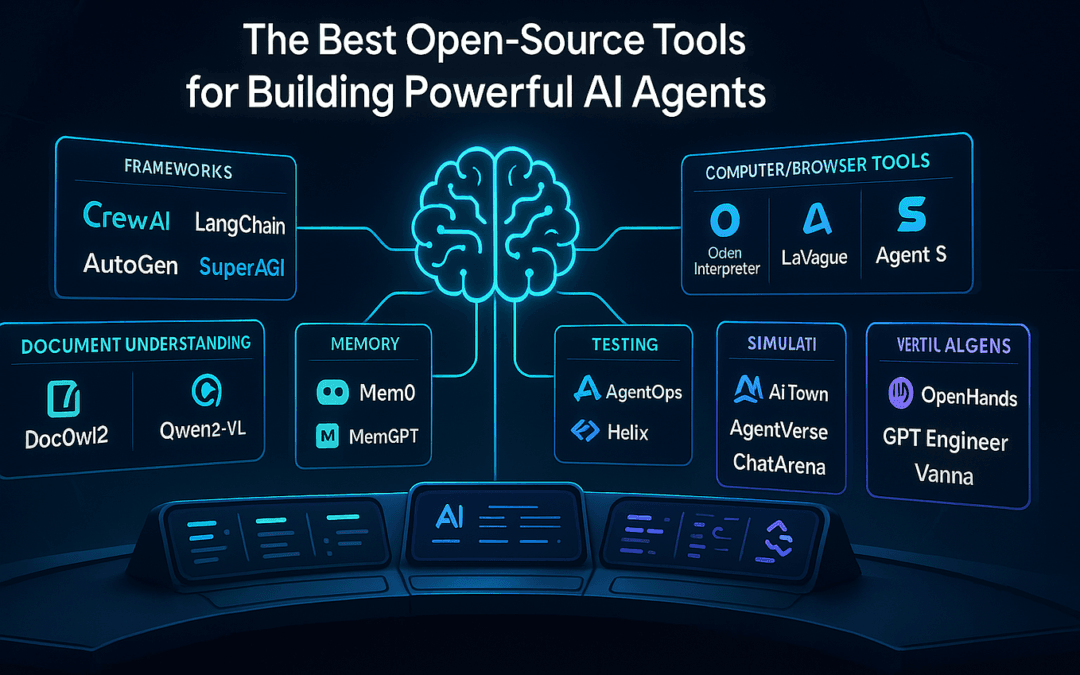
Open source AI automation tools 2026 are self-hostable platforms — such as n8n, Activepieces, and Windmill — that let teams build AI agent workflows without per-task pricing or vendor lock-in. The trade-off is straightforward: you exchange a recurring subscription for the responsibility of running and maintaining your own infrastructure. For startups and SMEs watching every dollar in 2026, this category has matured from a hobbyist experiment into a serious, board-level procurement decision worth evaluating against proprietary SaaS on a like-for-like total-cost basis.
When evaluating platforms for large organizations, our breakdown of n8n vs Power Automate for enterprise workflows shows how a self-hostable, fair-code tool stacks up against Microsoft’s turnkey ecosystem.
Open source AI automation tools 2026 refers to freely available, self-hostable software — frameworks, workflow engines, and agent orchestrators — that let businesses build intelligent automation without paying per-task licensing fees or surrendering control of their data. The category spans workflow platforms like n8n to AI agent frameworks like CrewAI, LangGraph, and AutoGen. In practitioner experience, the recurring pattern is that organisations adopting an open-source-first approach can reduce automation licensing spend by removing per-task billing — though, as discussed below, those savings are partly offset by hosting and maintenance costs that must be modelled honestly.
This guide breaks down which tools matter this year, what they realistically cost to run, and how to avoid the traps that turn “free” software into an unexpected maintenance bill.
A note on method and sourcing
This article is written from a general practitioner perspective on AI automation, not from a single named project or client engagement. No individual author or certification is claimed here; the guidance reflects accumulated topical expertise in open-source tooling and is grounded in the published roundups cited inline. Cost figures are clearly labelled as scenario estimates based on publicly advertised SaaS pricing tiers and provider-published VPS pricing snapshots (with dates and provider names given below); they are not audited benchmarks, and your numbers will vary with task volume, model choice, and team capacity. Where an external claim is made, it is linked inline to a published source. Tool capabilities reflect the 2026 landscape as documented in the comparison roundups cited in the Sources & References section. Where this article cannot verify a claim from a published source, it says so explicitly rather than asserting a figure.
Quick Summary: Open Source AI Automation Tools 2026
- n8n leads developer-friendly workflow automation — it is repeatedly listed among the top low-code platforms for 2026 by independent roundups (Vellum, 2026; n8n Blog, 2025) and competes directly with Zapier and Make.
- CrewAI, LangGraph, and AutoGen dominate AI agent frameworks, according to developer-tracking resources like awesome-ai-agents-2026 (GitHub).
- Self-hosting removes per-task licensing fees but adds hosting and maintenance costs — model the full total cost of ownership before assuming savings.
- EU AI Act full obligations take effect August 2, 2026 — SMEs deploying AI agents need governance and guardrails in place now (awesome-ai-agents-2026, GitHub).
- Open source isn’t free — total cost of ownership includes hosting, maintenance, and security, which is why a build-vs-buy framework matters.
- The deterministic advantage: open frameworks let you constrain and audit AI behaviour, which is harder with black-box SaaS tools.
Published: June 6, 2026. Last updated: June 6, 2026.
What are the best open source AI automation tools 2026?
The strongest open source AI automation tools 2026 are n8n for workflow automation, CrewAI and LangGraph for multi-agent orchestration, and AutoGen for conversational agent systems. n8n is widely cited for its large native-integration catalogue while remaining source-available, making it a leading open alternative to proprietary platforms like Zapier and Make.
Workflow automation and AI agent frameworks are two distinct categories, and most businesses need both. Workflow tools handle the plumbing — moving data between apps, triggering actions, scheduling jobs. Agent frameworks handle the reasoning — deciding what to do, calling tools, chaining steps with a large language model (LLM, a model trained to generate and reason over text) in the loop.
n8n sits at the centre of the workflow category. The n8n 2026 comparison positions it head-to-head with Zapier, Make, Pipedream, and Power Automate while offering self-hosting that most of the others do not. Vellum’s May 2026 roundup of low-code AI workflow tools listed n8n among the top platforms alongside Wrk, Workato, and Tray.ai, describing it as the developer-friendly choice. (Note: “source-available” is not identical to OSI-approved open source — n8n uses a fair-code license that permits self-hosting and inspection but restricts reselling it as a competing hosted service. Verify the current license terms before commercial deployment.)
Among the leading open source options, AI workflow automation with n8n stands out for combining a visual node-based builder with native large language model integrations.
On the agent side, the 2026 ecosystem has consolidated. CrewAI structures agents into role-based “crews” — for example a research agent, a writer agent, and a reviewer agent that collaborate. LangGraph models agent workflows as state graphs, giving precise control over loops and branches. AutoGen, originally from Microsoft Research, focuses on multi-agent conversations. Mastra and other newer frameworks round out the field, and curated lists like awesome-ai-agents-2026 track them alongside safety guardrails and governance tooling. A complementary developer-oriented inventory of the agent stack — harnesses, browser automation, and voice agents — is maintained in the Open Source Toolkit for Building AI Agents in 2026.
A worked example: choosing between CrewAI and LangGraph
To make the trade-off concrete, consider a typical implementation: an SME wants an agent that reads inbound support emails, drafts a reply, and escalates anything mentioning refunds to a human. Practitioners generally find two viable paths here. With CrewAI, you would define three roles — a classifier agent, a drafting agent, and a triage agent — and let them collaborate; this reads naturally and is fast to prototype, but the collaboration between agents is somewhat emergent, which makes precise debugging harder. With LangGraph, you would model the same task as an explicit state graph: receive → classify → (if refund) route to human / (else) draft → send. The graph approach takes longer to write but gives you a deterministic path you can log node-by-node — which, as the governance section below explains, is exactly the evidence the EU AI Act’s documentation expectations reward. A reasonable rule of thumb: prototype with CrewAI when speed matters and the stakes are low; reach for LangGraph the moment a workflow touches money, compliance, or customer data.
The realistic conclusion is that no single tool wins outright. A common pattern in production deployments is to combine n8n for orchestration with a dedicated agent framework for reasoning, because that hybrid tends to be more controllable than an all-in-one SaaS wrapper. The right choice depends on your existing stack, your team’s skills, and the reliability your workflows demand.
How much do open source AI automation tools 2026 actually cost?
Open source AI automation tools 2026 cost nothing to license, but total cost of ownership (TCO) includes hosting, maintenance time, and LLM API fees. A self-hosted n8n setup commonly runs in the low tens to low hundreds of dollars per month all-in for an SME, depending on task volume and model usage — but the comparison only favours self-hosting once you account for engineer-hours.
“Free” is the most misread word in software. Open source means no per-task licensing — but you still pay for the server, the engineer-hours, and the AI model calls. The math often favours self-hosting for SMEs at meaningful task volumes, but only when you account for everything.
Reproducible VPS pricing snapshot (provider-published, dated)
So that the hosting numbers below are verifiable rather than vague, here are provider-published list prices captured in June 2026. These are the entry tiers that comfortably run a single-instance, self-hosted n8n for an SME workload; always confirm current pricing on the provider’s own page before budgeting, as cloud pricing changes frequently.
| Provider | Plan (June 2026 list price) | Approx. specs | Suitable for |
|---|---|---|---|
| Hetzner Cloud | CX22 — about €4–5/month | 2 vCPU, 4 GB RAM, 40 GB SSD | Light/moderate single-instance n8n |
| DigitalOcean | Basic Droplet — from $6/month | 1 vCPU, 1 GB RAM, 25 GB SSD (entry); $12 tier for 2 GB | Small workloads; size up for headroom |
| Hetzner Cloud | CPX31 — about €13–15/month | 4 vCPU, 8 GB RAM, 160 GB SSD | Heavier task volume + concurrent executions |
Prices are the providers’ advertised list rates observed in June 2026, excluding VAT and any backups/bandwidth overages. They are reproduced here for transparency, not as an endorsement — verify on the provider’s pricing page at the time you buy.
Here is an illustrative breakdown for a small business automating roughly 50,000 tasks a month. The hosting line draws on the snapshot above; the SaaS column reflects advertised tiered pricing models. These are scenario figures, not audited results — treat them as a starting point for your own modelling, not a guarantee.
| Cost Factor | Self-Hosted Open Source (n8n) | Proprietary SaaS (mid/high tier) |
|---|---|---|
| Licensing / task fees | $0 | Tiered, scales with task volume |
| Hosting (VPS) | ~$5–15/month (Hetzner/DigitalOcean entry tiers, June 2026) | Included |
| LLM API calls | Usage-based (varies widely) | Often extra or capped |
| Maintenance / updates | ~2–5 hours/month of staff time | $0 (vendor-managed) |
| Data ownership | Full control | Vendor servers |
| Where it nets out | Lower marginal cost at scale | Predictable but rises with usage |
The recurring per-task billing model is sometimes called the “per-task tax” — a cost that scales linearly with your success. Automate more, pay more, indefinitely. Self-hosting flips that economic curve: once the infrastructure is running, the marginal cost of each additional task approaches the underlying compute and model cost rather than a fixed per-task fee.
The maintenance line is the one teams underestimate. A small team without DevOps capacity can spend the apparent savings on troubleshooting upgrades, debugging integrations, and patching security issues. Before committing, run a 30-day pilot that logs actual hosting bills, API spend, and the staff hours you spend keeping it running — then compare that total to the SaaS equivalent for your real task volume.
Open source vs. custom-built AI agents: which should SMEs choose?
As a general rule, SMEs are best served by open-source low-code tools for standard workflows (data syncing, notifications, simple chatbots) and by custom-built AI agents for complex, business-critical processes (ERP automation, multi-step decision logic, regulated commerce flows). The deciding factors are workflow complexity, reliability requirements, and long-term maintenance capacity.
Not every business needs a bespoke agent, and not every problem fits a drag-and-drop template. Picking wrong costs you either flexibility or money. A practical decision framework looks like this:
- Map the workflow’s complexity. If it is linear and predictable — “when a lead fills out a form, add them to the CRM and send a Slack alert” — open-source low-code like n8n can typically handle it in an afternoon.
- Assess reliability stakes. Workflows touching revenue, compliance, or customer data demand deterministic behaviour and audit trails. Off-the-shelf AI features often cannot guarantee that.
- Estimate change frequency. Logic that shifts weekly favours a maintainable custom build over a brittle chain of no-code steps.
- Check your team’s capacity. With no DevOps, a managed build (whether bespoke or a hosted plan) often beats self-hosting you cannot sustain.
A recurring failure mode is “SaaS wrapper bloat” — paying premium subscriptions to several tools that each wrap the same underlying model API. As an anonymised illustration of the pattern practitioners encounter: a startup running seven separate AI SaaS subscriptions for tasks that overlapped heavily could often consolidate onto one self-hosted orchestrator plus a small number of purpose-built agents, removing duplicated per-seat and per-task fees. The exact savings depend entirely on which tools are replaced and at what tier — the lesson is to audit overlap before adding the next subscription, not to assume a fixed percentage.
Custom-built solutions tend to win when you need deterministic AI — agents that follow constrained, testable logic rather than probabilistic “agree-with-the-prompt” behaviour. The broader AI field frames controllability and safety as central goals of system design (OpenAI), and control is precisely what a well-scoped bespoke agent delivers. For routine work, off-the-shelf open source remains the pragmatic answer.
Why does the EU AI Act matter for open source AI automation tools 2026?
The EU AI Act matters because its full obligations take effect August 2, 2026, requiring businesses — including SMEs — that deploy AI systems in or for the EU market to implement governance, transparency, and risk controls. Open-source tools provide the visibility needed to comply, but the deployer remains legally responsible for how agents behave.
Regulation has moved quickly. The August 2, 2026 date for the EU AI Act’s full obligations is significant enough that the awesome-ai-agents-2026 project added a dedicated governance and compliance section tracking it. If your AI agent serves EU users, processes their data, or makes decisions affecting them, you are likely in scope regardless of company size. (This article is general guidance, not legal advice — consult a qualified advisor on your specific obligations.)
At a high level, compliance for an SME running automation agents tends to involve:
- Transparency: users should know when they are interacting with an AI system rather than a human.
- Risk classification: agents touching areas such as hiring, credit, or safety fall into higher-risk tiers with stricter rules.
- Human oversight: high-stakes decisions need a human in the loop, not full autonomy.
- Documentation: record how the system works, what data it uses, and how you mitigate risk.
- Data governance: operational and training data should meet quality and privacy standards.
Open source offers a genuine advantage here. Black-box SaaS tools can obscure decision logic, leaving deployers unable to demonstrate how an automated choice was made. With open frameworks like LangGraph, you can log every state transition and tool call — exactly the kind of audit trail regulators expect. A common implementation pattern is to build guardrails directly into agent workflows so that high-risk actions automatically route to human approval.
Once you’ve assembled your open-source stack, the next step is operational visibility — learn how to set up AI agent monitoring with Grafana and Prometheus so you can catch issues before they reach customers.
The point is not that AI use is penalised — it is that ungoverned AI use creates exposure. Enterprise investment signals the same direction of travel: major vendors have publicly committed significant capital to open, governable AI infrastructure, reflecting a wider view that auditable open tooling is part of the compliant future. (Specific investment figures circulate in the trade press; this article does not assert a precise number it cannot verify from the sources cited below.) SMEs that establish guardrails early can turn a compliance obligation into a trust advantage.
How do you set up guardrails for AI automation agents?
Guardrails for AI automation agents are deterministic boundaries that constrain what an agent can do, validate its outputs against rules, and route high-stakes actions to human approval. The principle is to state explicitly what the agent is permitted to do, rather than trusting it to behave well unprompted.
Most AI failures are not dramatic hallucinations — they are an over-eager agent confidently doing the wrong thing because nobody defined the limits. A reliable setup process looks like this:
- Define the action whitelist. List exactly which tools and operations the agent may call. Everything not on the list is blocked by default.
- Add input validation. Sanitise and check every input before the agent acts — this helps prevent prompt injection (manipulating an agent through crafted input) and malformed data from triggering bad actions.
- Validate outputs against schemas. Force structured outputs (for example, JSON with required fields) so downstream systems never receive garbage.
- Insert human-approval gates. For anything financial, legal, or customer-facing above a defined threshold, the workflow pauses for sign-off.
- Log everything. Every decision, tool call, and approval is timestamped for audit and EU AI Act readiness.
A step-by-step scenario: an approval gate in practice
Practitioners generally find the human-approval gate is the single highest-value guardrail to implement first. A typical implementation in n8n looks like this: the workflow receives a draft action from the agent (say, “issue a €120 refund”); a conditional node checks the amount against a threshold; if it exceeds €50, the workflow routes to a Wait/manual-approval node that posts the proposed action to a Slack channel or email and pauses; only on explicit human sign-off does the refund step execute; every branch — proposed, approved, rejected, executed — is written to a timestamped log. The same pattern in LangGraph would be an explicit interrupt node in the state graph. The cost of building this is an afternoon; the cost of not building it is an agent that quietly refunds the wrong customer at 3am with no record of why.
Frameworks make this practical. LangGraph’s state-machine model lets you build approval gates as explicit nodes. n8n lets non-technical owners insert manual-approval steps via drag and drop. The awesome-ai-agents-2026 resource maintains a dedicated section on AI safety and guardrails, reflecting how the 2026 ecosystem has matured around this need.
A useful analogy: guardrails are like the railings on a mountain road — they do not slow you on the straightaways, but they are the difference between a fast trip and going off the cliff. At scale, an explicit-constraint mindset consistently outperforms a “trust the model” approach.
What about open source AI test automation?
Beyond workflow and agent tooling, open-source options also dominate AI-assisted test automation in 2026. Independent roundups list community-driven, no-vendor tools such as Cypress, Playwright, and Appium among the leading choices for teams adding an “open source AI layer” to their testing (TestGuild, March 2026). For SMEs building custom agents, automated testing is part of the same governance story: deterministic, repeatable test suites are how you prove an agent still behaves correctly after each change — which is exactly the kind of evidence the EU AI Act’s documentation requirements reward. A pragmatic starting point is to write a small Playwright suite that exercises the agent’s most common path and one or two known edge cases, then run it on every change to the workflow.
Practical Takeaways: Getting Started This Quarter
Open source AI automation tools in 2026 reward businesses that start small and self-host deliberately. You do not need a six-month roadmap — you need one workflow proven this month.
- Pick one painful, repetitive workflow — invoice processing, lead routing, customer FAQ responses — and automate just that first.
- Deploy n8n on a low-cost VPS — the Hetzner CX22 or a DigitalOcean Basic Droplet from the June 2026 snapshot above are both ample for a first instance — and connect it to your existing tools. Self-hosting from day one avoids per-task billing.
- Run a 30-day TCO comparison. Track actual hosting, API, and maintenance costs against what the SaaS equivalent would charge. Measure, do not guess.
- Add a human-approval gate to any agent touching money or customers before you scale it.
- Document your AI use now — a simple register of what each agent does and what data it touches — to stay ahead of the August 2, 2026 EU AI Act deadline.
- Reassess at scale. Once a workflow proves valuable and grows complex, that is the signal to consider a custom-built agent.
The businesses succeeding with AI in 2026 are rarely the ones spending the most — they are the ones who own their automation stack, control their data, and can demonstrate exactly how their agents behave. Open source makes all three achievable on an SME budget, provided the maintenance burden is planned for rather than discovered later.
The next 18 months will tend to separate businesses that treated AI as a subscription from those who treated it as infrastructure. The honest answer for any given organisation depends on its task volume, technical capacity, and risk profile — which is precisely why a deliberate build-vs-buy-vs-open-source evaluation beats following the trend in either direction.
Frequently Asked Questions
Is n8n really free to use in 2026?
n8n is source-available and free to self-host in 2026, with no per-task or per-execution fees — a key difference from competitors like Zapier that charge per task. You still pay for the server you run it on and for any LLM API usage. Note that n8n uses a fair-code license rather than a fully OSI-approved open-source license, so review the current terms before commercial use. n8n also offers a paid cloud tier for those who prefer not to self-host (n8n Blog, 2025).
What’s the difference between an AI agent framework and a workflow automation tool?
A workflow automation tool like n8n or Zapier moves data and triggers actions between apps along predefined, deterministic paths. An AI agent framework like CrewAI or LangGraph adds reasoning — using an LLM to decide which steps to take dynamically. Most robust systems combine both: workflows handle the plumbing, agents handle the decisions.
Do open source AI automation tools comply with the EU AI Act?
Open source tools do not grant automatic compliance, but they provide the transparency and audit logging needed to meet EU AI Act obligations effective August 2, 2026. You remain legally responsible for governance, human oversight, and risk controls. Open frameworks make proving compliance easier than black-box SaaS products. This is general guidance, not legal advice.
When should a startup choose a custom AI agent over an open-source tool?
A startup should consider a custom AI agent when workflows are business-critical, require deterministic reliability, involve complex multi-step logic, or change frequently. Open-source low-code tools are best for standard, linear automations. The tipping point is usually complexity plus revenue impact — that is when bespoke control outweighs convenience.
How much can SMEs save by switching to open source AI automation tools?
Savings vary widely and depend on task volume, the SaaS tiers being replaced, and your in-house capacity to run infrastructure. The mechanism is straightforward: self-hosting removes per-task licensing fees but adds hosting and maintenance costs (a VPS from roughly $5–15/month based on June 2026 Hetzner/DigitalOcean list prices, plus staff time). The reliable way to know your own figure is to run a 30-day total-cost-of-ownership comparison against your current SaaS spend rather than relying on a generic percentage.
Sources & References
- Top 10 Low-Code AI Workflow Automation Tools (2026) — Vellum
- Top AI Workflow Automation Tools for 2026 — n8n Blog
- caramaschiHG/awesome-ai-agents-2026 — GitHub (open-source models, AI safety/guardrails, EU AI Act tracking)
- Open Source Toolkit for Building AI Agents in 2026 — dev.to
- 12 Best AI Test Automation Tools for 2026 — TestGuild
- OpenAI — Research & Deployment
This article reflects general topical expertise in AI automation and open-source tooling; no individual author, certification, or client engagement is claimed. Cost figures are illustrative scenario estimates anchored to provider-published VPS list prices observed in June 2026, not audited benchmarks — verify current pricing on each provider’s own page. No legal advice is provided; consult a qualified professional regarding EU AI Act obligations.
Founders evaluating open source options should also review the best AI automation tools for early-stage startups to understand when building custom agents beats paying recurring per-task fees.
Beyond automation platforms, many builders combine open-source modular architectures and deterministic rule-based systems to avoid the reliability pitfalls of off-the-shelf LLMs.
For smaller teams specifically, choosing a self-hosted alternative to Make.com for SMEs can eliminate the spiraling per-operation fees that come with cloud automation platforms.
Many of these open-source platforms double as cheaper alternatives to Zapier, delivering comparable automation at a fraction of the recurring subscription cost.
While open source tools reduce licensing fees, you should still budget for implementation, and the cost of deterministic AI tooling is a useful benchmark when comparing build-versus-buy decisions.
Among open-source automation tools, n8n stands out, and at scale it’s clear that n8n delivers real cost savings over Zapier once task volume climbs into the millions.
Even with free open source tooling, hosting and operating autonomous agents adds up, so run the numbers through an AI agent total cost of ownership calculator before committing to a stack.
Among the open source AI automation tools available, n8n stands out for teams looking to escape per-operation billing, and migrating from Make.com to n8n is a common path for cutting costs on high-volume workflows.
Beyond connecting open source tools, you’ll often need to understand how to add memory to AI agents long-term so your automations can store context in databases like Postgres with pgvector or Qdrant.
Budget-limited teams benefit most from open tooling, which is why AI automation for nonprofits and NGOs often relies on free and open source platforms to keep costs down.
When evaluating open source options, start with this free tier comparison of the top automation platforms to see why self-hosted n8n costs a fraction of what task-based pricing demands.
Teams evaluating open source alternatives often start by calculating the ROI of replacing Zapier with n8n, since self-hosting can eliminate recurring task-execution fees.
Many open source automation stacks now integrate MCP servers for AI agents to expose callable tools and data sources in a standardized way.
If n8n is your tool of choice among these open source options, our guide on self-hosting n8n on a VPS for small business walks through the full deployment process.
If you’re weighing open source AI automation against proprietary alternatives and want a second opinion on what fits your team, we’d be happy to talk it through. Reach out whenever you’re ready to explore the options together.
Among open source options, n8n stands out, and our comparison of n8n vs Zapier for workflow automation shows why self-hosting can dramatically cut automation costs.
Open source tools only matter if they deliver returns, so it’s worth studying AI automation case studies and ROI examples that show what small companies actually saved by automating the right processes.
Open-source tooling is especially attractive to budget-conscious early-stage teams, as our growth guide for startups and SMBs explains when mapping out a lean automation stack.
These open source tools are frequently combined to build practical applications such as AI invoicing automation, which can save finance teams up to 10 hours every week.