
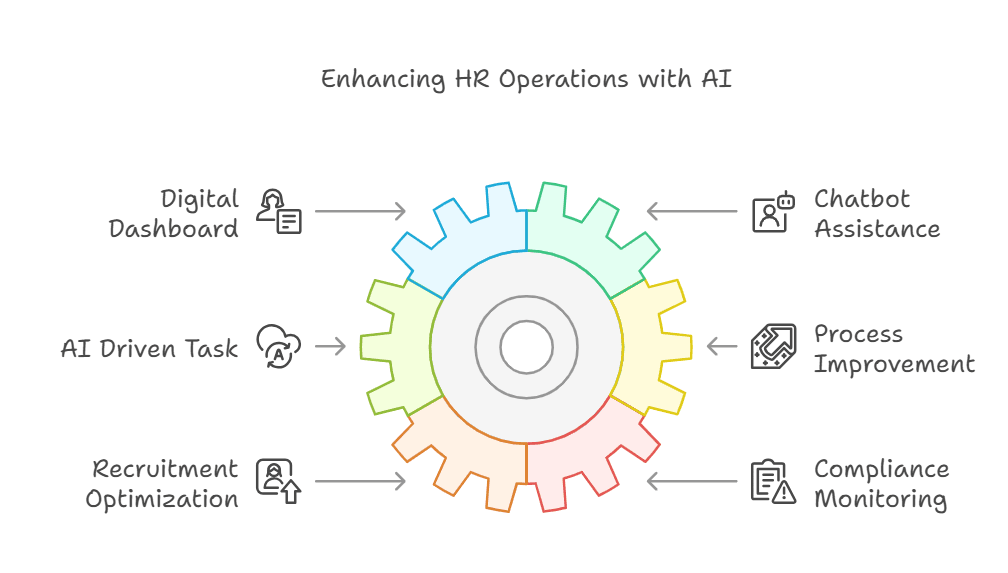
HR teams burn an estimated 14 hours a week on tasks a machine could handle better. Screening resumes, scheduling interviews, chasing onboarding paperwork, answering the same policy question for the 40th time — none of it requires human judgment, yet it eats the calendar of every people team in the world.
AI workflow automation for HR departments is the practice of using artificial intelligence and connected software to execute repetitive, rules-based HR processes — candidate screening, interview scheduling, onboarding, payroll prep, helpdesk responses, and offboarding — with minimal human intervention. Vendor analyses such as SecondTalent’s 2026 HR automation roundup report savings of 50–95% of the manual hours these tasks consume. As with most vendor-sourced figures, treat that range as a marketing-influenced ceiling rather than a guaranteed outcome — the realistic result for any given team depends heavily on task volume, data quality, and how much human review you retain.
Quick Summary: AI Workflow Automation for HR Departments
- Definition: AI workflow automation for HR departments uses AI agents and integration tools to handle repetitive HR processes — screening, scheduling, onboarding, helpdesk — automatically.
- Time savings: Vendor reports cite 50–95% reductions in manual hours on automatable tasks (SecondTalent, 2026); independent, peer-reviewed HR-specific figures remain scarce.
- Top use cases: resume screening, interview scheduling, employee onboarding, HR helpdesk chatbots, payroll prep, and sentiment analysis.
- Build vs. buy: Both paths are valid. Off-the-shelf tools like Workativ and TalentHR get you live fastest; custom agents trade upfront effort for lower long-run per-seat cost and tighter integration.
- Governance matters: Human-AI handoffs and oversight checkpoints are mandatory — not optional — for compliance and fairness.
- ROI is measurable: Calculate it as (hours saved × loaded hourly cost) − automation cost, not vague percentage promises.
Last updated: 6 June 2026. This article reflects publicly available sources and general implementation practice as of that date; it is informational and not legal or compliance advice.
What Is AI Workflow Automation for HR Departments?
AI workflow automation for HR departments uses AI agents, large language models, and integration platforms to complete repetitive HR tasks automatically. These tasks span the full employee lifecycle, from first application to final offboarding. According to IBM, AI in HR combines data analytics, machine learning, and automation to “save people time and support better outcomes.”
Think of it as adding a tireless coordinator who never forgets a follow-up, never misfiles a document, and never gets bored reading the 200th identical resume. The difference between this and a human coordinator? A well-built AI agent runs around the clock, costs a fraction of a salary, and produces consistent output every time — provided it is built deterministically and supervised properly.
The modern HR automation stack typically blends three layers. First, an LLM layer — large language model — such as the GPT-class models from OpenAI or comparable systems, used to read, summarize, and draft text. A large language model is a statistical system trained on vast text corpora to predict likely next words; it is powerful at language tasks but probabilistic by design, meaning it can produce confident-sounding errors. Second, an orchestration layer (n8n, Make, or Zapier) that connects your applicant tracking system (ATS), human resources information system (HRIS), calendar, and email. Third, a logic layer of explicit, hard-coded rules that decide what happens when — so the system behaves predictably rather than improvising.
Most HR automation failures trace back to skipping that third layer. A probabilistic “yes-machine” that approves time-off requests or screens candidates without hard rules becomes a liability fast. Practitioners generally find that the most reliable systems pair deterministic logic (fixed rules for decisions) with AI judgment (reading and drafting), rather than handing consequential decisions to a model alone. You can compare model and tooling options using the J. SERVO AI comparison tool.
Which HR Tasks Can You Automate With AI in 2026?
HR tasks most automatable with AI in 2026 are candidate screening, interview scheduling, onboarding paperwork, HR helpdesk responses, payroll preparation, and exit/offboarding workflows. TalentHR’s January 2026 analysis notes that HR can now “automate or help with onboarding, writing job ads, analyzing candidates, and drafting policies” with current AI.
Not every task deserves automation, though. The rule of thumb: automate anything that’s repetitive, rules-based, and high-volume. Keep humans firmly in charge of anything involving termination decisions, compensation negotiations, or sensitive grievances. Here’s where the wins concentrate:
Recruiting and Candidate Screening
Resume screening is often the highest-ROI HR automation, defined as the use of AI agents to parse, score, and rank job applications against predefined hiring criteria. An AI agent can process hundreds of applications — reading, extracting, and ranking against an explicit rubric — in minutes rather than days. AIHR documents AI agents that “automate tasks, enhance response times, and streamline workflows” across the recruiting funnel. The key is feeding the agent your actual hiring rubric, not letting it invent its own — and auditing the rankings for bias before you trust them (more on that below).
Interview Scheduling and Coordination
Interview scheduling and coordination is one of the most time-consuming bottlenecks in recruiting. Calendar logistics — proposing slots, handling reschedules, coordinating across panels — is highly rules-based and therefore well suited to automation. A typical implementation connects the ATS to interviewer calendars and lets an agent propose, confirm, and reschedule slots automatically, with a human stepping in only for exceptions.
Employee Onboarding
Employee onboarding automation is the use of software to provision accounts, assign training, schedule check-ins, collect signed documents, and answer common new-hire questions the moment an offer is accepted — often surfaced through a chatbot. New hires get a smoother week-one experience while HR skips the manual chase. MindStudio documents how teams build these intelligent onboarding workflows without writing code.
HR Helpdesk and Employee Support
An intelligent HR chatbot can deflect a large share of routine tickets — PTO balances, policy lookups, benefits questions — before a human ever sees them. Deploy it on Slack, Teams, or WhatsApp, and your HR team stops being a human FAQ. Set realistic expectations: deflection rates vary with how complete and well-maintained your knowledge base is, and edge-case questions should always route to a person.
Sentiment Analysis and Offboarding
AI can analyze pulse surveys and exit interviews at scale, surfacing attrition signals managers might otherwise miss. Offboarding automation revokes access, processes final paperwork, and schedules knowledge transfer — closing security gaps that manual processes tend to leave open. Because sentiment models can misread tone and context, treat their output as a prompt for human investigation, not a verdict.
Build vs. Buy: Custom AI Agents or Off-the-Shelf HR SaaS?
There is no universally correct answer to build-vs-buy — the right choice depends on your technical resources, timeline, headcount, and how much you value control versus speed. Off-the-shelf platforms like Workativ and TalentHR get you live quickly and require little engineering; custom AI agents take more upfront effort but can reduce recurring per-seat fees and integrate directly with your existing stack. Below is an evidence-based way to think it through, rather than a blanket recommendation.
One genuine cost factor worth naming is what practitioners sometimes call the “subscription stack” or “Zapier tax” — a layer of metered, per-task or per-seat tools that can compound at scale. A 50-person company might pay separately for an ATS add-on, a chatbot license, a scheduling tool, and an integration platform, none of which talk to each other natively. That said, off-the-shelf tools also bundle in maintenance, security patching, and support that a custom build forces you to own yourself — a real cost that’s easy to underestimate.
Here’s a balanced comparison of your three real options:
| Approach | Upfront Cost | Ongoing Cost | Customization | Lock-in Risk | Best For |
|---|---|---|---|---|---|
| General LLM (ChatGPT/Claude) | Low | ~$20–60/user/mo | Manual, prompt-based | Low | Ad-hoc drafting, tiny teams |
| Dedicated HR SaaS (Workativ, TalentHR) | Low–Medium | ~$5–20/employee/mo | Limited to vendor features | Higher | Teams wanting fast, supported, turnkey setup with minimal engineering |
| Custom AI agents (n8n + LLM) | Medium–High | Hosting plus maintenance time | Full control | Lower | Teams with engineering capacity and complex or scaling workflows |
At high execution volumes, self-hosting an orchestration tool like n8n can be substantially cheaper than per-execution SaaS pricing. But “cheaper at volume” assumes you actually reach that volume and have someone to keep the server, integrations, and security current. For a small team running a few hundred executions a month, a managed platform is frequently the more economical and lower-risk choice once you price in your own time.
The honest tradeoff: custom builds require upfront engineering and ongoing maintenance ownership; off-the-shelf tools trade some of that control and per-seat cost for speed, support, and a maintained security posture. If you have no technical resources and need something live next week, a dedicated platform is a sensible starting point — and a perfectly defensible long-term one for many teams. If you’re planning to scale past 50 employees and have engineering capacity, owned infrastructure with a clear implementation roadmap can pay off. Pilot the cheapest viable option first and let real data, not a vendor pitch, decide your next step.
How Do You Implement AI Workflow Automation for HR Departments?
Implementing AI workflow automation for HR departments follows a six-step process: audit your tasks, prioritize by ROI, map the workflow, build with deterministic logic, add human-AI handoffs, then measure and iterate. The biggest mistake is automating everything at once instead of proving value on one high-volume task first.
A disciplined rollout looks like this:
- Audit your HR tasks. List every recurring process and log how many hours each consumes per week. You can’t automate what you haven’t measured.
- Prioritize by ROI. Rank tasks by (volume × time-per-task × frequency). Resume screening and helpdesk tickets almost always top the list.
- Map the workflow explicitly. Draw every step, decision point, and exception before touching any tool. Ambiguity here becomes bugs later.
- Build with deterministic logic. Use AI for judgment (reading, summarizing, drafting) and hard-coded rules for decisions (approvals, routing, thresholds).
- Insert human-AI handoffs. Define exactly where a person reviews output — every rejection over a threshold, every flagged anomaly, every edge case.
- Measure and iterate. Track hours saved, error rates, and employee satisfaction weekly. Refine the rules as real data exposes gaps.
Industry commentary increasingly describes “human-AI handoffs” as a defining feature of the future workplace — the points where automation passes control back to a human for judgment, oversight, or empathy. Get these handoffs right and you build trust. Skip them and one bad automated decision can undermine your credibility with employees.
A typical phased rollout (illustrative example). Consider a mid-sized company that automates only candidate screening in the first phase. A realistic before/after picture looks like this: before automation, two recruiters spend roughly 20 hours a week manually shortlisting; after deploying an AI screening agent with a human review checkpoint, that drops to a few hours of reviewing the agent’s ranked shortlist. Practitioners generally run the new workflow in parallel with the manual one for two to four weeks, compare outputs, then expand to scheduling and onboarding only once the first workflow is proven. Proof beats promises when you’re asking a skeptical HR team to trust a machine.
How Do You Calculate ROI on HR Automation?
Calculate HR automation ROI with this formula: (hours saved per month × loaded hourly cost of HR staff) − monthly automation cost = net monthly savings. Most published sources cite vague “50–95%” ranges; the actual dollar figure depends on your specific task volumes and labor costs. The example below uses illustrative inputs — plug in your own numbers.
Here’s a worked example for a 40-person SME automating resume screening and HR helpdesk. (These are sample figures, not measured results from a specific company.)
- Resume screening: 20 hours/month saved × $35 loaded hourly rate = $700/month
- Helpdesk deflection: 25 hours/month saved × $35 = $875/month
- Onboarding coordination: 12 hours/month saved × $35 = $420/month
- Gross monthly savings: $1,995
- Automation cost (hosting/licensing + amortized build or subscription): ~$400/month
- Net monthly savings: ~$1,595, or roughly $19,140/year
Two caveats keep this honest. First, “loaded hourly cost” should include benefits and overhead, not just base salary. Second, the math above ignores soft benefits — faster time-to-hire, fewer compliance slips, happier employees — but it also ignores hidden costs like maintenance time, prompt tuning, and the occasional manual correction. Subtract a realistic maintenance buffer before you present a number to your CFO. Run your own figures with the J. SERVO tooling rather than relying on percentage claims from any single vendor.
What About AI Governance and Compliance in HR?
AI governance in HR requires documented oversight: bias audits on screening models, human review of consequential decisions, data-privacy compliance, and an audit trail for every automated action. Industry observers consistently flag governance as the area where HR teams most often lag behind their automation ambitions.
HR is among the highest-risk places to deploy unsupervised AI. A screening agent that learns biased patterns from historical hiring data can quietly replicate that bias at scale — and the employer typically owns the legal liability. The fix isn’t avoiding automation; it’s building guardrails:
- Bias testing: Audit screening outputs across demographic groups regularly, not once at launch.
- Human review checkpoints: Require a person to approve any decision that affects someone’s employment, pay, or status.
- Transparency: Tell candidates and employees when AI is involved in a process touching them.
- Data minimization: Feed agents only the data they need, and respect GDPR, CCPA, and local privacy law. Confirm your obligations with qualified legal counsel for your jurisdiction.
- Audit logging: Record every automated action so you can explain and defend any decision later.
Deterministic systems make compliance dramatically easier. When your automation runs on explicit rules rather than a black-box model’s output, you can show exactly why a given decision happened. That auditability is the difference between confidently passing an employment-law review and scrambling to explain what your AI did and why. Note that emerging regulation (such as the EU AI Act, which classifies many HR uses as high-risk) is still evolving — build with documentation and human oversight as defaults.
Your Practical Next Steps
Don’t try to automate your entire HR function this quarter. Pick the one task that’s both high-volume and low-judgment — almost always resume screening or helpdesk tickets — and prove it works. Here’s a workable 30-day action plan:
- Week 1: Log hours spent on your top five repetitive HR tasks. Pick the one with the highest (volume × time) score.
- Week 2: Map that workflow end to end, including every exception and decision point.
- Week 3: Build a pilot with deterministic logic and a clear human-review checkpoint. Run it in parallel with your manual process.
- Week 4: Compare results — hours saved, error rate, satisfaction. If it holds up, scale to the next task.
The teams that win at AI workflow automation for HR departments treat it as an engineering and governance discipline, not just a software purchase. They measure, they build deterministically, they keep humans in the loop where judgment matters — and they choose build-vs-buy on evidence, not ideology.
The gap between HR teams running well-governed agentic workflows and those still drowning in manual coordination is widening. The question isn’t whether your HR department adopts automation — it’s whether you’ll choose the path (custom or off-the-shelf) that genuinely fits your team’s resources, and whether you’ll govern it responsibly once it’s live.
Frequently Asked Questions
What is AI workflow automation for HR departments?
AI workflow automation for HR departments is the use of AI agents and integration tools to handle repetitive HR processes automatically — including candidate screening, interview scheduling, onboarding, helpdesk responses, and offboarding. Vendor analyses such as SecondTalent’s 2026 report claim it can reclaim 50–95% of the manual hours these tasks consume, though actual results vary by team.
How much time can AI save HR teams?
Vendor sources cite savings of 50–95% of manual hours on automatable tasks (SecondTalent, 2026). Independent, peer-reviewed HR-specific figures are still limited, so treat that range as a vendor-influenced ceiling. A realistic estimate for your team comes from measuring one workflow before and after automation rather than applying a published percentage.
Should HR teams build custom AI agents or buy SaaS?
It depends on your resources and timeline. Off-the-shelf platforms like Workativ and TalentHR suit teams needing fast, supported, turnkey setup with minimal engineering. Custom AI agents can reduce per-seat fees and improve integration at scale, but require upfront engineering and ongoing maintenance ownership. Pilot the cheapest viable option first and decide on real data.
Is AI safe to use for hiring decisions?
AI is safe for hiring support when paired with bias audits, human review of consequential decisions, and transparent disclosure to candidates. AI should screen and rank candidates, but a human should make final employment decisions. Deterministic, rule-based systems are easier to audit and defend in compliance reviews than black-box models. Confirm legal obligations with qualified counsel.
What HR tasks should you automate first?
Automate resume screening and HR helpdesk tickets first, since both are high-volume, rules-based, and low-judgment — making them strong starting points. An intelligent HR chatbot can deflect a meaningful share of routine tickets when backed by a well-maintained knowledge base, freeing your team for work that genuinely requires human judgment.
Sources & References
- IBM — Artificial Intelligence for Human Resources
- SecondTalent — Top 10 HR AI Workflow Automation Examples (2026) (vendor source; figures are vendor-reported)
- TalentHR — 11 HR Tasks You Can Automate with AI (2026 Update) (vendor source)
- AIHR — AI Agents for HR: Use Cases & Examples
- MindStudio — AI in HR: Build Intelligent Workflows Without Code (vendor source)
- OpenAI — Research & Deployment
- Wikipedia — Artificial Intelligence (background reference)
Transparency note: this article references several vendor and platform sources for use-case and pricing context; where a figure originates from a commercial vendor, it is labeled as such. Vendor-reported savings should be validated against your own measured results before being used for budgeting decisions.
About this content: this guide is written from general topical expertise in HR automation and workflow engineering. It is informational and does not constitute legal, compliance, or financial advice. Verify regulatory obligations with qualified professionals in your jurisdiction.