
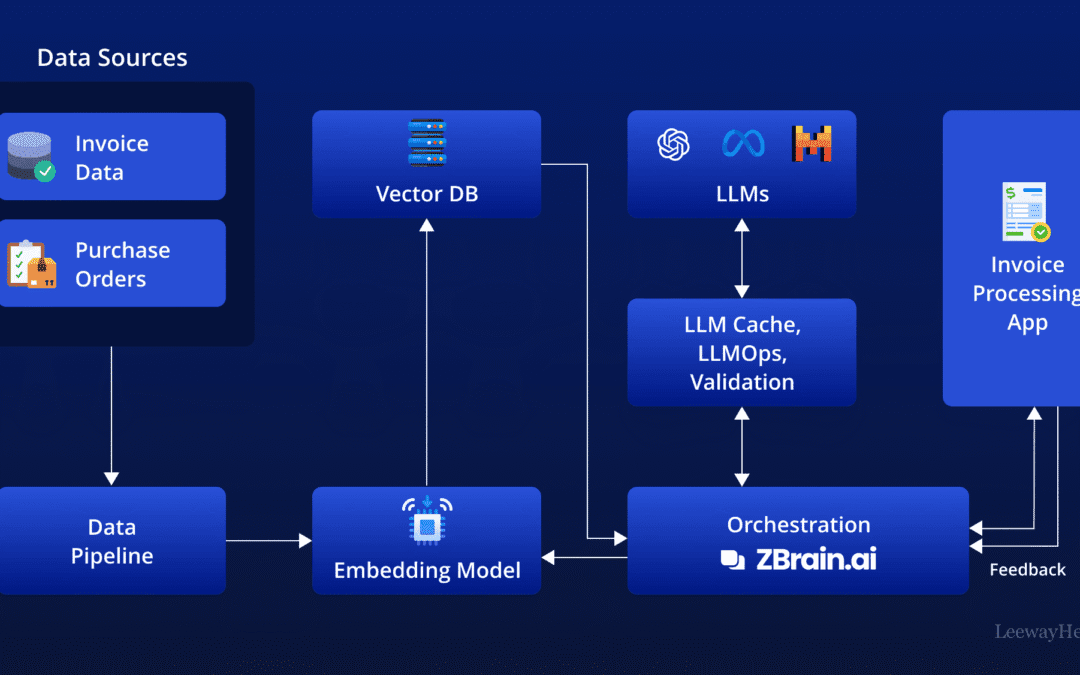
Finance teams waste significant time on manual invoice processing — keying data, chasing approvals, and fixing errors that a machine would never make. Industry vendors estimate the cost of processing a single invoice manually runs into the double digits, while AI-driven workflows can cut that dramatically. If you’re still copying invoice numbers into a spreadsheet at 9 PM, you’re paying what practitioners call the manual tax — and it compounds every month.
How to automate invoicing with AI means using machine learning, optical character recognition (OCR), and rule-based agents to extract invoice data, validate it against purchase orders, route approvals, and trigger payments — without humans touching every line. The result: faster cash flow, fewer errors, and finance staff freed for actual analysis. This guide walks SMEs through the tools, the tradeoffs, and a 90-day path from manual chaos to deterministic automation.
A note on this guide and how to read the numbers
This article is written from a practitioner’s perspective on finance automation and AI workflow design. Where we cite a figure — processing-cost reductions, OCR accuracy, time savings — we attribute it to the originating source so you can verify it yourself. Several of the most widely quoted statistics in this field (for example, “$15 per manual invoice” or “95% OCR accuracy”) originate as vendor benchmarks rather than independent audits. We flag them as such throughout. No commercial relationship exists between this site and QuickBooks, Zoho, Tipalti, Precoro, ScryAI, or n8n; they are named because they dominate the current landscape, not because they sponsor this content. Published and last reviewed: June 2026.
Quick Summary: Key Takeaways
- AI invoice automation uses OCR plus machine learning to extract, validate, and route invoice data automatically. Vendors such as Tipalti claim this reduces manual data entry by up to 80%.
- Off-the-shelf tools like QuickBooks, Zoho Invoice, and Tipalti handle standard workflows; custom AI agents (built on n8n or similar) integrate with your specific ERP and edge cases.
- OCR accuracy is generally reported above 95% on clean, structured invoices in vendor benchmarks, but discrepancy detection and approval logic deliver the bigger practical ROI.
- Reported time-reduction figures vary widely by source and invoice mix; treat “60–80%” as a vendor-claimed range, not a guarantee.
- The most reliable builds keep a human-in-the-loop for exceptions while automating the routine majority of invoices.
- A realistic implementation roadmap typically spans about 90 days: audit, pilot, integrate, scale.
What Is AI Invoice Automation and How Does It Work?
AI invoice automation is the use of optical character recognition, machine learning, and workflow agents to capture invoice data, validate it against purchase orders and contracts, route approvals, and schedule payments — with minimal manual intervention. Modern systems handle structured and unstructured invoices across PDFs, emails, and scanned images.
Defining the key terms: OCR (optical character recognition) converts an image of text into machine-readable characters. Machine learning here refers to models trained to map extracted text to accounting fields and to recognise patterns (e.g. “this looks like a duplicate”). An agent is a piece of software that executes a multi-step workflow — read, validate, route, pay — according to rules and model outputs, rather than a single isolated task.
The mechanism is straightforward once you break it down. An invoice arrives — email attachment, supplier portal, or scanned paper. OCR reads the document and extracts fields: vendor name, invoice number, line items, totals, tax, due date. A machine learning layer then maps those fields to your accounting structure and flags anything that doesn’t match a purchase order or historical pattern. According to Tipalti’s AI Invoice Processing guide, modern systems “flag discrepancies, guide invoice approvals, and automate the payment of global supplier invoices” in a single connected flow — a vendor description of its own product capabilities.
Tipalti claims that AI-driven invoice processing can reduce manual data entry by up to 80% while improving accuracy on high-volume accounts payable (Tipalti, AI Invoice Processing, accessed June 2026). ScryAI’s 2025 review of invoice software similarly states that automation “resolves invoice discrepancies, automates approvals, and simplifies invoice reconciliation” across real-world finance workflows (ScryAI, 12 Best Invoice Processing Software, 2025). Both figures are vendor-published; independent finance teams should benchmark against their own document quality before assuming the same results.
The four core stages of automated invoicing
- Capture & extract: OCR plus AI reads the invoice and pulls structured data — vendor benchmarks report 95%+ accuracy on clean, standard formats.
- Validate & match: The system cross-checks against purchase orders, contracts, and prior invoices (two-way and three-way matching).
- Route & approve: Rules-based logic sends invoices to the right approver — and escalates exceptions to a human.
- Pay & reconcile: Approved invoices trigger payment and auto-update your general ledger.
In practice, stage two — validation — is where the biggest hidden ROI tends to sit. Anyone can scan an invoice. The money is in catching the duplicate charge, the wrong tax rate, or the supplier who quietly raised prices 12%. A worked example: suppose a supplier submits two invoices in the same month with identical line items but different invoice numbers. A capture-only system records both; a validation layer comparing line-item hashes against recent history flags the second as a probable duplicate before it ever reaches payment. That single rule can pay for the build.
How to Automate Invoicing With AI: A Step-by-Step Roadmap
Automating invoicing with AI follows a five-stage roadmap: audit your current process, choose between off-the-shelf and custom tools, pilot on a single invoice type, integrate with your ERP, then scale. Most SMEs complete this in roughly 90 days, with measurable cost savings often appearing within the first six to eight weeks of a focused pilot.
Jumping straight to a tool purchase is the most common mistake practitioners report. Founders buy a platform before understanding their own bottleneck — and then wonder why the “automation” still needs three people babysitting it. Map the process first.
Step 1: Audit your invoice volume and exceptions
Invoice volume auditing is the process of counting your monthly invoices, classifying them by type, and documenting every exception before choosing an automation tool. Work through three tasks:
- Count and categorise: Export the last three months of invoices and group them by vendor type, recurring vs. one-off, and currency.
- Log every exception: Disputed amounts, missing purchase orders, foreign currency, partial payments, and odd formats. The exception rate — not the headline volume — usually determines build complexity.
- Identify the bottleneck: Is the delay in data entry, approval chasing, or reconciliation? Automating the wrong stage wastes the project.
A service business processing 200 invoices a month with 90% recurring needs a very different solution than a manufacturer juggling 2,000 invoices with constant three-way matching.
Step 2: Choose your automation layer
Decide between a SaaS invoicing platform, an AP automation vendor, or a custom AI agent. QuickBooks and Zoho Invoice work well for straightforward recurring billing and reminders — and are the tools most frequently recommended in community discussions such as this r/Entrepreneur thread (Nov 2024). Tipalti and Precoro target complex AP with global suppliers. Custom agents — often built on self-hosted n8n workflows — tend to win when your ERP is non-standard or your edge cases break templated tools.
Step 3: Pilot on one invoice type
Start narrow. Automate just your recurring SaaS-vendor invoices, or just one supplier category. A focused pilot proves accuracy and surfaces integration gaps before you bet your whole AP function on the system. Set a concrete success threshold up front — for example, “95% field-level extraction accuracy and zero missed duplicates over 100 invoices” — so the pilot has a pass/fail line rather than a vibe.
Step 4: Integrate with your ERP and accounting stack
Connect the automation to QuickBooks, Xero, NetSuite, or your custom ERP via API. Real integration — not CSV exports — is where off-the-shelf tools often stall and where a custom AI agent build earns its keep. CSV-based syncs introduce a lag and a silent-error surface: a mismatched column or a re-uploaded file can post duplicate ledger entries that nobody notices until reconciliation.
Step 5: Add human-in-the-loop and scale
Route the routine majority automatically; flag the messy minority to a human reviewer. Once accuracy holds above your threshold for a month, expand to the next invoice type. Knowing how to automate invoicing with AI is less about the model and more about disciplined rollout.
Off-the-Shelf SaaS vs. Custom AI Agents: Which Should SMEs Choose?
Off-the-shelf invoicing SaaS suits businesses with standard workflows and modest volume, while custom AI agents fit companies with non-standard ERPs, complex approval chains, or high exception rates. The deciding factors are integration depth, exception complexity, and total cost over three years — not feature checklists.
A practical caution: SMEs are often sold more platform than they need, then charged again on integrations. A low monthly invoicing app can climb several-fold once you add the ERP connector, the approval add-on, and per-transaction fees. Run the three-year total-cost math before you commit — and ask vendors to quote the connector and per-invoice fees explicitly, not just the headline subscription.
| Factor | Off-the-Shelf SaaS (QuickBooks, Zoho, Tipalti) | Custom AI Agent (n8n / bespoke) |
|---|---|---|
| Setup time | Days to 2 weeks | 4–8 weeks |
| Monthly cost | $49–$2,000+ (scales with volume; add-ons extra) | Hosting + one-time build (~$0–$50 hosting on self-hosted n8n) |
| ERP integration | Pre-built connectors, limited customization | Full API-level control |
| Exception handling | Templated rules | Tailored to your edge cases |
| Best for | Standard recurring billing, <500 invoices/mo | Complex AP, custom ERP, high volume |
| Data ownership | Vendor cloud | Your infrastructure |
| Maintenance burden | Vendor-managed updates | You own upgrades and uptime |
The DIY movement is real. On Reddit’s r/n8n community, a creator’s free n8n “Financial Controller” AI agent template (Mar 2025) drew strong engagement, signalling demand for ownable, customizable invoice automation outside walled-garden SaaS. Separately, in a November 2025 LinkedIn post, Jerry Liu wrote: “Build an AI agent to automate your finance team’s entire invoice/expense workflow,” demonstrating an end-to-end agentic build. Treat these community templates as starting points, not production-ready systems — they typically need hardening around error handling and audit logging.
A reasonable default: start with off-the-shelf if your process is genuinely standard. The moment you’re paying for three add-ons to force-fit your workflow, a custom agent often becomes cheaper and more reliable over a multi-year horizon — but only if you have the engineering capacity to maintain it.
What ROI Can You Expect From AI Invoice Automation?
Vendors commonly cite a 60–80% reduction in invoice processing time and a drop in per-invoice cost from the mid-teens of dollars to a few dollars after automating with AI. These ranges originate from vendor marketing material (e.g. Tipalti and ScryAI) and assume favourable conditions — clean documents, high recurring volume, and tight ERP integration. Your mileage depends heavily on your exception rate.
Even so, the ROI math is worth modelling concretely. Take a 50-person company processing 800 invoices monthly. If your fully-loaded manual cost is around $15 per invoice, that’s $12,000/month — $144,000 a year. If automation brings it to $3 per invoice, the saving is roughly $115,000 annually. Crucially, plug in your own per-invoice cost: measure it by timing a sample batch and dividing loaded staff cost by invoices processed, rather than trusting the vendor’s $15 figure outright.
Beyond labor, three often-undercounted gains can stack up:
- Early-payment discounts: Faster approvals let you capture terms like 2/10 net-30 you previously missed — often 1–2% of invoice value.
- Penalty avoidance: Fewer late payments means fewer fees and stronger supplier relationships.
- Fraud and duplicate detection: AI flags duplicate invoices and suspicious amounts that humans miss under volume pressure.
Want hard numbers for your own case? Use our free Invoice Automation ROI Calculator to model savings against your actual volume before you spend a dollar on tooling. (Disclosure: this is a tool published by this site.)
A realistic case pattern
A common staged pattern looks like this. A startup automates capture and validation first and sees substantial time savings within the first two months on its recurring-vendor invoices. It then layers in approval routing, picking up further gains by month four. Critically, the exception-heavy invoices — disputed amounts, multi-currency, partial payments — stay manual far longer, which is why blended savings rarely hit the headline 80% across the whole AP function on day one. Deterministic, staged rollout beats a big-bang flip in almost every account we see described in practice.
What Are the Risks and Limitations of AI Invoicing?
The main risks of AI invoice automation are OCR misreads on poor-quality documents, over-reliance on probabilistic models that “guess” wrong, and weak ERP integration that creates silent data errors. Transparent, human-supervised, deterministic design mitigates each one.
Be honest about the failure modes — vendor demos rarely show them. OCR is excellent on clean digital PDFs but degrades on crumpled scans, handwriting, or unusual layouts. The same systems that report 95%+ accuracy on clean inputs can fall well below that on poor ones. That’s why blind, unsupervised automation is dangerous in a finance context.
The bigger trap is what practitioners sometimes call model sycophancy — a system that produces a confident answer regardless of whether it’s correct. A probabilistic model might “approve” an invoice because it pattern-matches to legitimate ones, not because it verified the PO. In finance, a confident wrong answer is worse than no answer. Deterministic rules — “reject if amount exceeds PO by more than 2%” — keep the system honest and auditable.
Mitigation comes down to design discipline:
- Keep a human-in-the-loop for exceptions and high-value invoices.
- Use deterministic validation rules alongside AI extraction — not AI judgment alone.
- Log every decision for an audit trail your auditors and CFO can inspect.
- Integrate via API, not file exports, to eliminate silent sync errors.
Community threads on invoice automation, such as the r/Entrepreneur discussion (Nov 2024), repeatedly recommend established tools like Zoho Invoice, QuickBooks, and Expensify for reliability — a reminder that proven workflows often beat shiny demos. The goal isn’t the most AI; it’s the most reliable outcome with the least human babysitting.
Practical Takeaways: Your First 30 Days
If you do nothing else, do these five things in your first month to start automating invoicing with AI:
- Week 1: Export your last three months of invoices and categorize them by type and exception rate.
- Week 2: Measure your real per-invoice cost, then run the ROI calculator with your actual volume to set a savings target.
- Week 3: Pick one high-volume, low-complexity invoice type for your pilot, with a written pass/fail accuracy threshold.
- Week 4: Choose between a SaaS trial (Zoho/QuickBooks) and a custom agent scope — and test OCR accuracy on your worst documents, not your best.
- Ongoing: Measure time-per-invoice weekly. If it’s not dropping, your integration — not the AI — is usually the problem.
Knowing how to automate invoicing with AI is ultimately about sequencing: automate the boring majority, supervise the tricky exceptions, and never let a probabilistic model sign a check unsupervised.
The businesses that benefit most aren’t the ones with the flashiest AI — they’re the ones who turn invoicing from a cost center into a quiet, deterministic engine. The question isn’t whether you’ll automate invoicing. It’s whether you’ll own the system or rent it at a premium for the long term.
Frequently Asked Questions
How accurate is AI invoice processing?
Vendor benchmarks from Tipalti and ScryAI (2025) report over 95% data-extraction accuracy on clean, structured digital invoices. These are vendor-published figures rather than independent audits, and accuracy drops on poor scans or handwriting — which is why deterministic validation rules and human review for exceptions remain essential.
How much does it cost to automate invoicing with AI?
Off-the-shelf SaaS ranges from around $49 to over $2,000 per month depending on volume and add-ons, while a custom AI agent typically involves a one-time build plus near-zero hosting (around $0–$50/month on self-hosted n8n). Vendor data suggests per-invoice cost can fall from roughly $15 manually to under $3 automated; verify both figures against your own loaded costs.
Can small businesses automate invoicing without enterprise software?
Yes. Small businesses can automate invoicing with tools like QuickBooks, Zoho Invoice, or custom n8n-based AI agents — no enterprise platform required. Vendor-reported time savings of 60–80% within the first quarter are achievable with lightweight, ERP-integrated automation, though actual results depend on your invoice mix and exception rate.
What is the difference between invoice automation and AP automation?
Invoice automation focuses on capturing and processing individual invoices, while accounts payable (AP) automation covers the full procure-to-pay cycle including approvals, payments, and reconciliation. AP automation platforms like Tipalti and Precoro extend invoice automation into end-to-end financial workflows.
Should I build a custom AI invoicing agent or buy SaaS?
Buy SaaS if your invoice workflow is standard and volume is under roughly 500 per month. Build a custom AI agent if you have a non-standard ERP, complex approval chains, or high exception rates — and the engineering capacity to maintain it. A custom build commonly becomes more cost-effective within 12–18 months in those scenarios.
Sources & References
- Tipalti — AI Invoice Processing: How It Works and Key Benefits (vendor source; accessed June 2026).
- ScryAI — 12 Best Invoice Processing Software for Automating AP (2025) (vendor source).
- Reddit r/n8n — Automate Invoice Management with this n8n AI Agent (community template, 10 Mar 2025).
- Reddit r/Entrepreneur — Looking for an AI-driven solution to automate invoice management (community discussion, 20 Nov 2024).
- Jerry Liu, LinkedIn — Build an AI agent to automate your finance team’s invoice/expense workflow (7 Nov 2025).
Statistics on per-invoice cost, OCR accuracy, and time savings cited above are drawn from the vendor sources listed and should be validated against your own data before relying on them for budgeting decisions.
Last updated: 2026-06-06
Note: This article is for general informational purposes; verify specifics against your own context.